> ## Documentation Index
> Fetch the complete documentation index at: https://docs-dev-feat-one-trust-integration.mintlify.site/llms.txt
> Use this file to discover all available pages before exploring further.

> Configure an update policy form using Forms for Actions

# Use Cases: Configure an update policy form using Forms

<Card title="Before you start">
  1. Create a [Machine-to-Machine Application](/docs/get-started/auth0-overview/create-applications/machine-to-machine-apps) with the following scopes enabled:

  * `read:users`
  * `update:users`
  * `create:users`
  * `read:users_app_metadata`
  * `update:users_app_metadata`
  * `create:users_app_metadata`

  2. Add a [Vault connection](/docs/customize/forms/vault) using the M2M application credentials.
</Card>

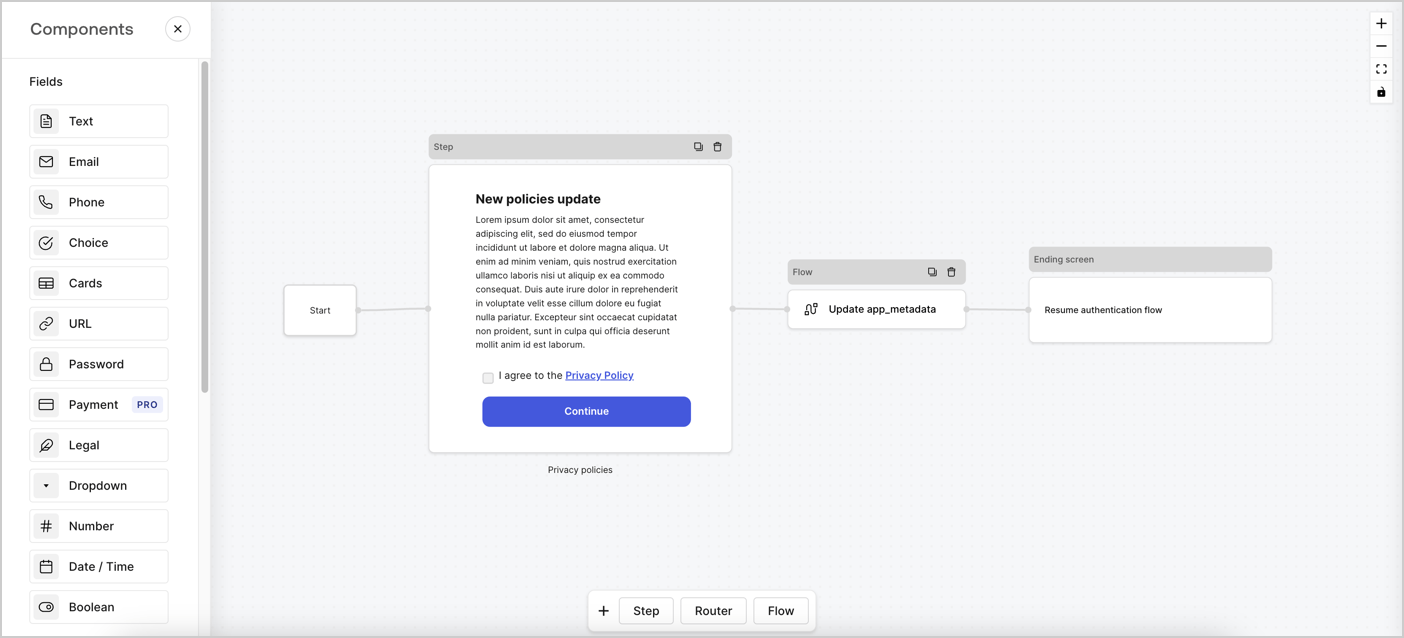
Forms for Actions allows you to create custom privacy policies flows and store the consent under the `app_metadata` object.
<Frame>
  <img src="https://mintcdn.com/docs-dev-feat-one-trust-integration/tei1JI_KQMNN6IYU/docs/images/cdy7uua7fh8z/6i68dMvHDTijfRmSgN1x8Q/ad900e7d4c0fb34645921435472b8684/privavy-policy-form.png?fit=max&auto=format&n=tei1JI_KQMNN6IYU&q=85&s=5622166946e077ef82c50ad2c17d7f25" alt="Dashboard > Actions > Forms > Privacy policy use case" data-og-width="1404" width="1404" data-og-height="638" height="638" data-path="docs/images/cdy7uua7fh8z/6i68dMvHDTijfRmSgN1x8Q/ad900e7d4c0fb34645921435472b8684/privavy-policy-form.png" data-optimize="true" data-opv="3" srcset="https://mintcdn.com/docs-dev-feat-one-trust-integration/tei1JI_KQMNN6IYU/docs/images/cdy7uua7fh8z/6i68dMvHDTijfRmSgN1x8Q/ad900e7d4c0fb34645921435472b8684/privavy-policy-form.png?w=280&fit=max&auto=format&n=tei1JI_KQMNN6IYU&q=85&s=db748fae7807c46073b2af50b1b48e6a 280w, https://mintcdn.com/docs-dev-feat-one-trust-integration/tei1JI_KQMNN6IYU/docs/images/cdy7uua7fh8z/6i68dMvHDTijfRmSgN1x8Q/ad900e7d4c0fb34645921435472b8684/privavy-policy-form.png?w=560&fit=max&auto=format&n=tei1JI_KQMNN6IYU&q=85&s=81f49050de872e6c5166e7bb2c347b99 560w, https://mintcdn.com/docs-dev-feat-one-trust-integration/tei1JI_KQMNN6IYU/docs/images/cdy7uua7fh8z/6i68dMvHDTijfRmSgN1x8Q/ad900e7d4c0fb34645921435472b8684/privavy-policy-form.png?w=840&fit=max&auto=format&n=tei1JI_KQMNN6IYU&q=85&s=f37f9c83d2b3f7fec63eb9b6d6a772b5 840w, https://mintcdn.com/docs-dev-feat-one-trust-integration/tei1JI_KQMNN6IYU/docs/images/cdy7uua7fh8z/6i68dMvHDTijfRmSgN1x8Q/ad900e7d4c0fb34645921435472b8684/privavy-policy-form.png?w=1100&fit=max&auto=format&n=tei1JI_KQMNN6IYU&q=85&s=5e0c654e5260dd9aacb311ce54ff86e2 1100w, https://mintcdn.com/docs-dev-feat-one-trust-integration/tei1JI_KQMNN6IYU/docs/images/cdy7uua7fh8z/6i68dMvHDTijfRmSgN1x8Q/ad900e7d4c0fb34645921435472b8684/privavy-policy-form.png?w=1650&fit=max&auto=format&n=tei1JI_KQMNN6IYU&q=85&s=9d309ec889d8ee0799d2c77fb98cf896 1650w, https://mintcdn.com/docs-dev-feat-one-trust-integration/tei1JI_KQMNN6IYU/docs/images/cdy7uua7fh8z/6i68dMvHDTijfRmSgN1x8Q/ad900e7d4c0fb34645921435472b8684/privavy-policy-form.png?w=2500&fit=max&auto=format&n=tei1JI_KQMNN6IYU&q=85&s=8a21746b9dc62d9a778ff777580a7b64 2500w" />
</Frame>

The sections below outline how you can create an Update Policy form using nodes and flows, along with steps for adding your form to a [Post Login](/docs/customize/actions/explore-triggers/signup-and-login-triggers/login-trigger) Action.

## Create a form from scratch

Follow these steps to create a form to gather information:

1. Open the Form editor by selecting **Auth0 Dashboard > Actions > Forms.**
2. Select **Create Form** > **Start from scratch**.

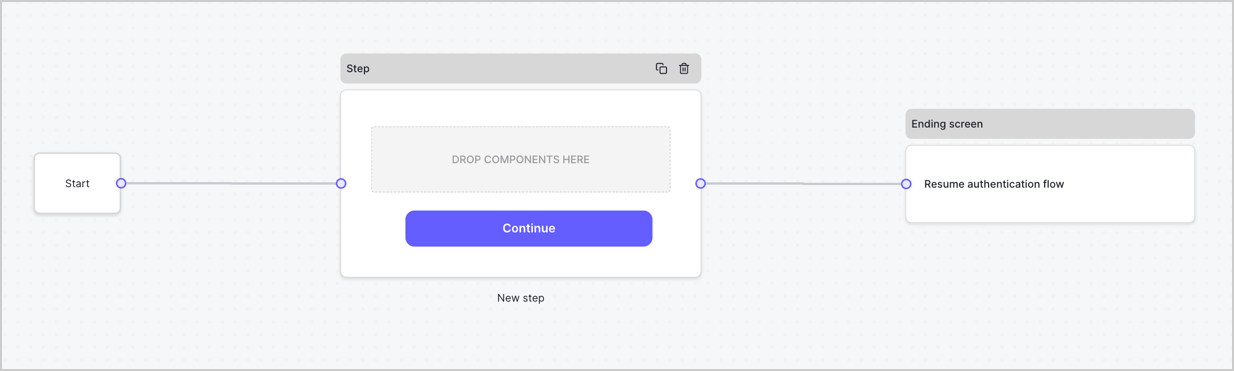
By default, a new form contains a Start node, a Step node, and an Ending screen node.
<Frame>
  <img src="https://mintcdn.com/docs-dev-feat-one-trust-integration/u-UL1EdKBAficAnO/docs/images/cdy7uua7fh8z/2TZ9jSjgEcARFpULI6hz4R/a4319a1bd482f2ee5cc23100fdb2f42c/New-form-Forms-for-action-use-case.png?fit=max&auto=format&n=u-UL1EdKBAficAnO&q=85&s=2f9e51a31a88a1103aa5ccba1fbafed8" alt="Dashboard > Forms > Use Cases > Form" data-og-width="1234" width="1234" data-og-height="371" height="371" data-path="docs/images/cdy7uua7fh8z/2TZ9jSjgEcARFpULI6hz4R/a4319a1bd482f2ee5cc23100fdb2f42c/New-form-Forms-for-action-use-case.png" data-optimize="true" data-opv="3" srcset="https://mintcdn.com/docs-dev-feat-one-trust-integration/u-UL1EdKBAficAnO/docs/images/cdy7uua7fh8z/2TZ9jSjgEcARFpULI6hz4R/a4319a1bd482f2ee5cc23100fdb2f42c/New-form-Forms-for-action-use-case.png?w=280&fit=max&auto=format&n=u-UL1EdKBAficAnO&q=85&s=1793c3b9d194c92a4e24f333358d36f2 280w, https://mintcdn.com/docs-dev-feat-one-trust-integration/u-UL1EdKBAficAnO/docs/images/cdy7uua7fh8z/2TZ9jSjgEcARFpULI6hz4R/a4319a1bd482f2ee5cc23100fdb2f42c/New-form-Forms-for-action-use-case.png?w=560&fit=max&auto=format&n=u-UL1EdKBAficAnO&q=85&s=7260da1920b78f316751d55303009c9d 560w, https://mintcdn.com/docs-dev-feat-one-trust-integration/u-UL1EdKBAficAnO/docs/images/cdy7uua7fh8z/2TZ9jSjgEcARFpULI6hz4R/a4319a1bd482f2ee5cc23100fdb2f42c/New-form-Forms-for-action-use-case.png?w=840&fit=max&auto=format&n=u-UL1EdKBAficAnO&q=85&s=39ad73f3a6c739c243fc9204ab333824 840w, https://mintcdn.com/docs-dev-feat-one-trust-integration/u-UL1EdKBAficAnO/docs/images/cdy7uua7fh8z/2TZ9jSjgEcARFpULI6hz4R/a4319a1bd482f2ee5cc23100fdb2f42c/New-form-Forms-for-action-use-case.png?w=1100&fit=max&auto=format&n=u-UL1EdKBAficAnO&q=85&s=47f8378beacf705d9fb3d770accf8d8c 1100w, https://mintcdn.com/docs-dev-feat-one-trust-integration/u-UL1EdKBAficAnO/docs/images/cdy7uua7fh8z/2TZ9jSjgEcARFpULI6hz4R/a4319a1bd482f2ee5cc23100fdb2f42c/New-form-Forms-for-action-use-case.png?w=1650&fit=max&auto=format&n=u-UL1EdKBAficAnO&q=85&s=7f5aff7ad29ffc0ef4057f06408bf09d 1650w, https://mintcdn.com/docs-dev-feat-one-trust-integration/u-UL1EdKBAficAnO/docs/images/cdy7uua7fh8z/2TZ9jSjgEcARFpULI6hz4R/a4319a1bd482f2ee5cc23100fdb2f42c/New-form-Forms-for-action-use-case.png?w=2500&fit=max&auto=format&n=u-UL1EdKBAficAnO&q=85&s=f9137110640d11e98b27054d746ae28a 2500w" />
</Frame>

### Configure the Step node

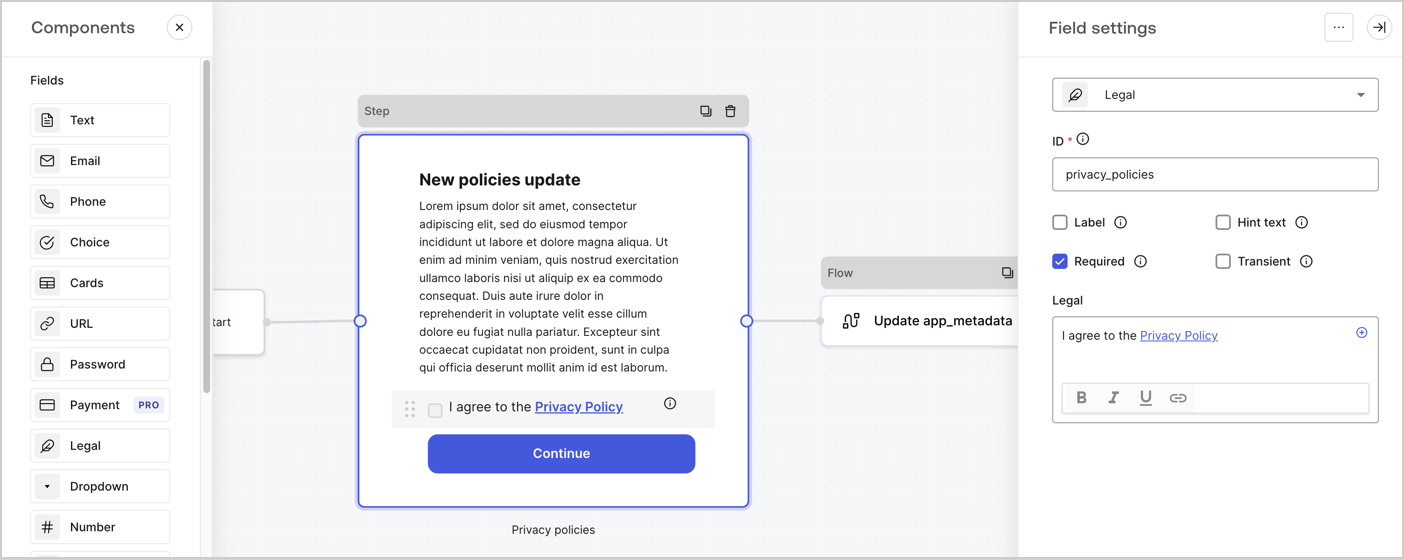
The Step node is the graphical interface visible to users. Add [Fields](/docs/customize/forms/nodes-and-components) to the Step node to collect the new agreement acceptance value by following these steps:

1. Drag a **Rich text** field from the **Components menu** into the **Step** node.

   * **Rich text**: Enter a description of your privacy policies updates.
   * Select **Save**.
2. Drag a **Legal** field into the **Step** node.

   * **ID**: Enter `privacy_policies`.
   * **Required**: Enable the checkbox.
   * **Legal**: Enter `I agree to the Privacy Policy`.
   * Select **Save**.
3. Select **Publish** to save.
<Frame>
  <img src="https://mintcdn.com/docs-dev-feat-one-trust-integration/UhycnN7Dv2VF4a64/docs/images/cdy7uua7fh8z/59zFFjQjAnjogkc2QGIqqJ/0ad66b1b636544122aa4e65968b76c2c/privacy-policy-step-node.png?fit=max&auto=format&n=UhycnN7Dv2VF4a64&q=85&s=b0d2a479a5a69d6da54c7a19ddae40f3" alt="Dashboard > Actions > Forms > Use case privacy policy step node" data-og-width="1404" width="1404" data-og-height="559" height="559" data-path="docs/images/cdy7uua7fh8z/59zFFjQjAnjogkc2QGIqqJ/0ad66b1b636544122aa4e65968b76c2c/privacy-policy-step-node.png" data-optimize="true" data-opv="3" srcset="https://mintcdn.com/docs-dev-feat-one-trust-integration/UhycnN7Dv2VF4a64/docs/images/cdy7uua7fh8z/59zFFjQjAnjogkc2QGIqqJ/0ad66b1b636544122aa4e65968b76c2c/privacy-policy-step-node.png?w=280&fit=max&auto=format&n=UhycnN7Dv2VF4a64&q=85&s=6c27dda618cff4f8a33c579ab32081ef 280w, https://mintcdn.com/docs-dev-feat-one-trust-integration/UhycnN7Dv2VF4a64/docs/images/cdy7uua7fh8z/59zFFjQjAnjogkc2QGIqqJ/0ad66b1b636544122aa4e65968b76c2c/privacy-policy-step-node.png?w=560&fit=max&auto=format&n=UhycnN7Dv2VF4a64&q=85&s=01aac34d32aaed23ea8f506ccb39d332 560w, https://mintcdn.com/docs-dev-feat-one-trust-integration/UhycnN7Dv2VF4a64/docs/images/cdy7uua7fh8z/59zFFjQjAnjogkc2QGIqqJ/0ad66b1b636544122aa4e65968b76c2c/privacy-policy-step-node.png?w=840&fit=max&auto=format&n=UhycnN7Dv2VF4a64&q=85&s=b9374827c67536a25fbeeb3ec88631af 840w, https://mintcdn.com/docs-dev-feat-one-trust-integration/UhycnN7Dv2VF4a64/docs/images/cdy7uua7fh8z/59zFFjQjAnjogkc2QGIqqJ/0ad66b1b636544122aa4e65968b76c2c/privacy-policy-step-node.png?w=1100&fit=max&auto=format&n=UhycnN7Dv2VF4a64&q=85&s=fed18dbe723880f974a4b803b3732dc4 1100w, https://mintcdn.com/docs-dev-feat-one-trust-integration/UhycnN7Dv2VF4a64/docs/images/cdy7uua7fh8z/59zFFjQjAnjogkc2QGIqqJ/0ad66b1b636544122aa4e65968b76c2c/privacy-policy-step-node.png?w=1650&fit=max&auto=format&n=UhycnN7Dv2VF4a64&q=85&s=c4aa8ab66882468780215155a7bebee3 1650w, https://mintcdn.com/docs-dev-feat-one-trust-integration/UhycnN7Dv2VF4a64/docs/images/cdy7uua7fh8z/59zFFjQjAnjogkc2QGIqqJ/0ad66b1b636544122aa4e65968b76c2c/privacy-policy-step-node.png?w=2500&fit=max&auto=format&n=UhycnN7Dv2VF4a64&q=85&s=221f6e63f30be758a89bf8346fb2fce8 2500w" />
</Frame>

### Configure the Flow node

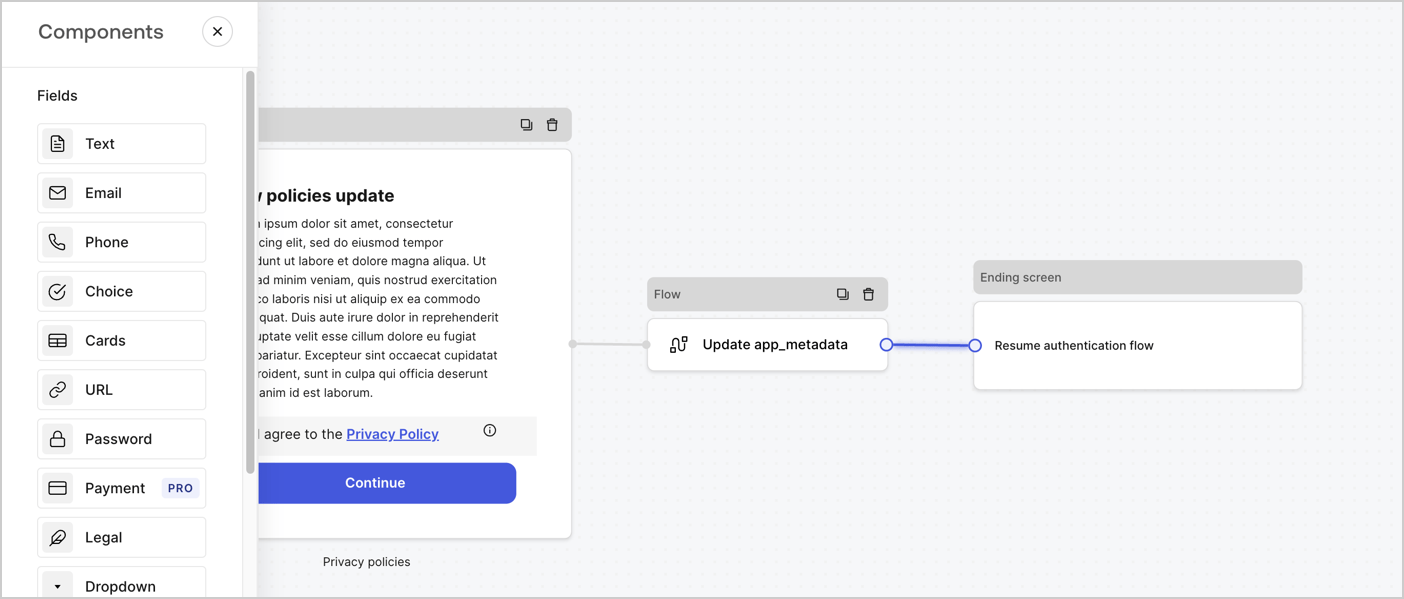
Add a **Flow** node after the **Step** node to update the `app_metadata` and resume the authentication flow by following these steps:

1. Select **Flow** from the bottom of the Form editor.
2. Remove the existing link between the **Step** and **Ending Screen** nodes.
3. Select the new **Flow** > **Click to add a flow** > **Create a new flow.**

   * Enter `Update app_metadata` in the **Name** field.
   * Select **Create**.
   * Select **Save**.
4. Link the **Flow** node to the **Step** and **Ending Screen** nodes as pictured below.
5. Select **Publish** to save.
<Frame>
  <img src="https://mintcdn.com/docs-dev-feat-one-trust-integration/tei1JI_KQMNN6IYU/docs/images/cdy7uua7fh8z/6YIkzm7SrpM9LW76AXuRzh/353c518fe82bbaa440836da1d83596d6/link-policies.png?fit=max&auto=format&n=tei1JI_KQMNN6IYU&q=85&s=300f7243f907ed70aad1c610b20337b0" alt="Dashboard > Actions > Forms > Form" data-og-width="1404" width="1404" data-og-height="599" height="599" data-path="docs/images/cdy7uua7fh8z/6YIkzm7SrpM9LW76AXuRzh/353c518fe82bbaa440836da1d83596d6/link-policies.png" data-optimize="true" data-opv="3" srcset="https://mintcdn.com/docs-dev-feat-one-trust-integration/tei1JI_KQMNN6IYU/docs/images/cdy7uua7fh8z/6YIkzm7SrpM9LW76AXuRzh/353c518fe82bbaa440836da1d83596d6/link-policies.png?w=280&fit=max&auto=format&n=tei1JI_KQMNN6IYU&q=85&s=64a4934b6a445a82062d4b77fe3f081f 280w, https://mintcdn.com/docs-dev-feat-one-trust-integration/tei1JI_KQMNN6IYU/docs/images/cdy7uua7fh8z/6YIkzm7SrpM9LW76AXuRzh/353c518fe82bbaa440836da1d83596d6/link-policies.png?w=560&fit=max&auto=format&n=tei1JI_KQMNN6IYU&q=85&s=5b5a8e20cb591019b7aa8cb93fccda69 560w, https://mintcdn.com/docs-dev-feat-one-trust-integration/tei1JI_KQMNN6IYU/docs/images/cdy7uua7fh8z/6YIkzm7SrpM9LW76AXuRzh/353c518fe82bbaa440836da1d83596d6/link-policies.png?w=840&fit=max&auto=format&n=tei1JI_KQMNN6IYU&q=85&s=bd92e4ada6f4f1c29c4cb51c9524ab50 840w, https://mintcdn.com/docs-dev-feat-one-trust-integration/tei1JI_KQMNN6IYU/docs/images/cdy7uua7fh8z/6YIkzm7SrpM9LW76AXuRzh/353c518fe82bbaa440836da1d83596d6/link-policies.png?w=1100&fit=max&auto=format&n=tei1JI_KQMNN6IYU&q=85&s=56e5d5ce8a8711b057443f388375c5b1 1100w, https://mintcdn.com/docs-dev-feat-one-trust-integration/tei1JI_KQMNN6IYU/docs/images/cdy7uua7fh8z/6YIkzm7SrpM9LW76AXuRzh/353c518fe82bbaa440836da1d83596d6/link-policies.png?w=1650&fit=max&auto=format&n=tei1JI_KQMNN6IYU&q=85&s=5f22b5304eae5e06a660b5f51a55fa33 1650w, https://mintcdn.com/docs-dev-feat-one-trust-integration/tei1JI_KQMNN6IYU/docs/images/cdy7uua7fh8z/6YIkzm7SrpM9LW76AXuRzh/353c518fe82bbaa440836da1d83596d6/link-policies.png?w=2500&fit=max&auto=format&n=tei1JI_KQMNN6IYU&q=85&s=070e9b7a93447afbad108f60b979f5b1 2500w" />
</Frame>

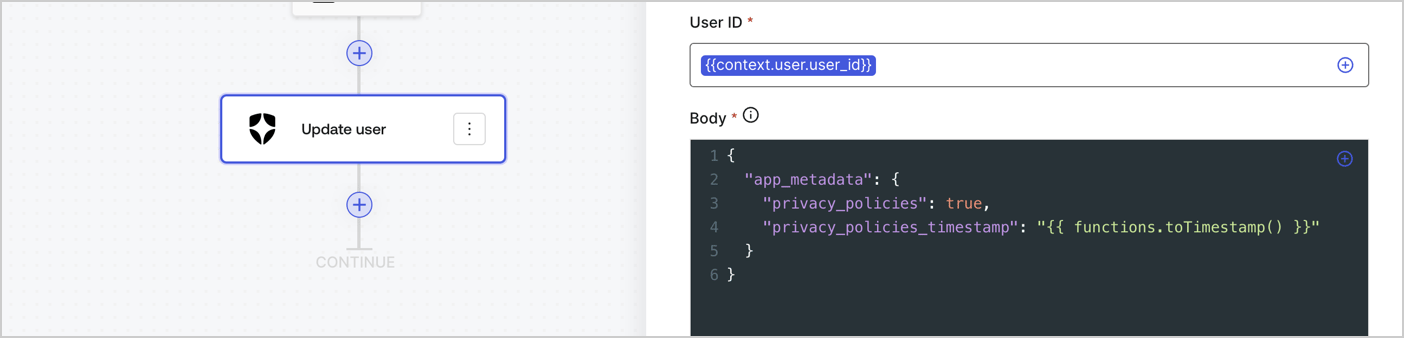
Add an Auth0 Update user action to the flow by following these steps:

1. Select the **Flow** **Update app\_metadata** > **Edit flow** to open the Flow editor in a new tab.
2. Below the StartAction, select the **+** icon to add an **Update user** action. Complete the fields below, then select **Save** to continue.

   * **Connection**: Select from the dropdown the Vault connection to your M2M application.

   * **User ID**: Enter `{{context.user.user_id}}`.

   * **Body**: Copy and paste the following code to update the app\_metadata with the privacy\_policies and privacy\_policies\_timestamp properties.

     ```text lines theme={null}
     {
       "app_metadata": {
         "privacy_policies": true,
         "privacy_policies_timestamp": "{{ functions.toTimestamp() }}"
       }
     }
     ```

   * Select **Save**.
3. Select **Publish** to save.
<Frame>
  <img src="https://mintcdn.com/docs-dev-feat-one-trust-integration/n3I4qhmZsH4Y5_rn/docs/images/cdy7uua7fh8z/CvMNIwWrOUwaFW4X3G28p/1fb70ae57a20749d9ffaaba8dc0b7e26/update-user-privacy.png?fit=max&auto=format&n=n3I4qhmZsH4Y5_rn&q=85&s=e739ea17a4f21aa7a9e1998cef53ff1c" alt="Dashboard > Actions > Forms > User case privacy policy code" data-og-width="1404" width="1404" data-og-height="338" height="338" data-path="docs/images/cdy7uua7fh8z/CvMNIwWrOUwaFW4X3G28p/1fb70ae57a20749d9ffaaba8dc0b7e26/update-user-privacy.png" data-optimize="true" data-opv="3" srcset="https://mintcdn.com/docs-dev-feat-one-trust-integration/n3I4qhmZsH4Y5_rn/docs/images/cdy7uua7fh8z/CvMNIwWrOUwaFW4X3G28p/1fb70ae57a20749d9ffaaba8dc0b7e26/update-user-privacy.png?w=280&fit=max&auto=format&n=n3I4qhmZsH4Y5_rn&q=85&s=0a160bae6390f0d980022819d0943796 280w, https://mintcdn.com/docs-dev-feat-one-trust-integration/n3I4qhmZsH4Y5_rn/docs/images/cdy7uua7fh8z/CvMNIwWrOUwaFW4X3G28p/1fb70ae57a20749d9ffaaba8dc0b7e26/update-user-privacy.png?w=560&fit=max&auto=format&n=n3I4qhmZsH4Y5_rn&q=85&s=d9d3fc925dbe2e8bee94920c740a8949 560w, https://mintcdn.com/docs-dev-feat-one-trust-integration/n3I4qhmZsH4Y5_rn/docs/images/cdy7uua7fh8z/CvMNIwWrOUwaFW4X3G28p/1fb70ae57a20749d9ffaaba8dc0b7e26/update-user-privacy.png?w=840&fit=max&auto=format&n=n3I4qhmZsH4Y5_rn&q=85&s=38e6e62e066552119289690176935726 840w, https://mintcdn.com/docs-dev-feat-one-trust-integration/n3I4qhmZsH4Y5_rn/docs/images/cdy7uua7fh8z/CvMNIwWrOUwaFW4X3G28p/1fb70ae57a20749d9ffaaba8dc0b7e26/update-user-privacy.png?w=1100&fit=max&auto=format&n=n3I4qhmZsH4Y5_rn&q=85&s=9ea10ca73457a9189fd5e5b63e2cad3b 1100w, https://mintcdn.com/docs-dev-feat-one-trust-integration/n3I4qhmZsH4Y5_rn/docs/images/cdy7uua7fh8z/CvMNIwWrOUwaFW4X3G28p/1fb70ae57a20749d9ffaaba8dc0b7e26/update-user-privacy.png?w=1650&fit=max&auto=format&n=n3I4qhmZsH4Y5_rn&q=85&s=efd6c452d08f0a002a6c27e9c6c59301 1650w, https://mintcdn.com/docs-dev-feat-one-trust-integration/n3I4qhmZsH4Y5_rn/docs/images/cdy7uua7fh8z/CvMNIwWrOUwaFW4X3G28p/1fb70ae57a20749d9ffaaba8dc0b7e26/update-user-privacy.png?w=2500&fit=max&auto=format&n=n3I4qhmZsH4Y5_rn&q=85&s=d5c9358bf6ee7a1c946c5e766abfb7fb 2500w" />
</Frame>

<Callout icon="file-lines" color="#0EA5E9" iconType="regular">
  The flow **Update app\_metadata** adds a `privacy_policies true` value to the app`_metadata` object and also generates a timestamp with a [helper function.](/docs/customize/forms/variables)
</Callout>

## Retrieve the form render code

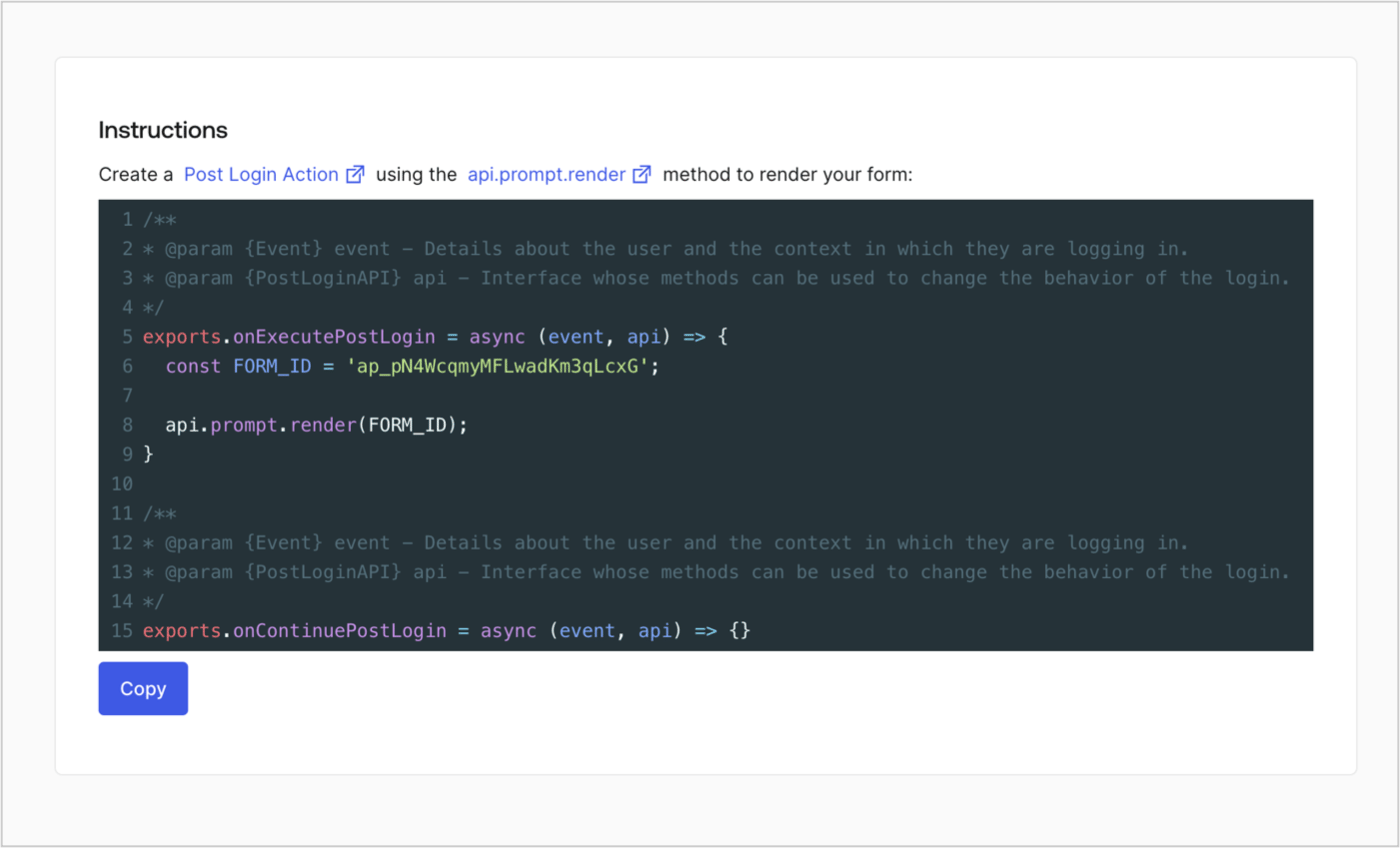
Retrieve your form render code to visually render the form with a custom Post Login Action by following these steps:

* From the Form editor, select **`<> Render`**.
* Select **Copy**.
<Frame>
  <img src="https://mintcdn.com/docs-dev-feat-one-trust-integration/4BnowEk5h1zBwcWW/docs/images/cdy7uua7fh8z/2EIUzc539sq9lwoTKbjoJv/496a864c0fc44a782c9cadca119dbfb0/embed.png?fit=max&auto=format&n=4BnowEk5h1zBwcWW&q=85&s=8fae1644855bd91c09f1fc22a2df5d83" alt="Dashboard > Actions > Forms > Form > Embed" data-og-width="1400" width="1400" data-og-height="848" height="848" data-path="docs/images/cdy7uua7fh8z/2EIUzc539sq9lwoTKbjoJv/496a864c0fc44a782c9cadca119dbfb0/embed.png" data-optimize="true" data-opv="3" srcset="https://mintcdn.com/docs-dev-feat-one-trust-integration/4BnowEk5h1zBwcWW/docs/images/cdy7uua7fh8z/2EIUzc539sq9lwoTKbjoJv/496a864c0fc44a782c9cadca119dbfb0/embed.png?w=280&fit=max&auto=format&n=4BnowEk5h1zBwcWW&q=85&s=1157b4e1dba715459475bd3060fd1d93 280w, https://mintcdn.com/docs-dev-feat-one-trust-integration/4BnowEk5h1zBwcWW/docs/images/cdy7uua7fh8z/2EIUzc539sq9lwoTKbjoJv/496a864c0fc44a782c9cadca119dbfb0/embed.png?w=560&fit=max&auto=format&n=4BnowEk5h1zBwcWW&q=85&s=e976c611feb4206c4e01ff3aaf7a5d18 560w, https://mintcdn.com/docs-dev-feat-one-trust-integration/4BnowEk5h1zBwcWW/docs/images/cdy7uua7fh8z/2EIUzc539sq9lwoTKbjoJv/496a864c0fc44a782c9cadca119dbfb0/embed.png?w=840&fit=max&auto=format&n=4BnowEk5h1zBwcWW&q=85&s=5d608157a4fc2f382be8ab7451e7dbf8 840w, https://mintcdn.com/docs-dev-feat-one-trust-integration/4BnowEk5h1zBwcWW/docs/images/cdy7uua7fh8z/2EIUzc539sq9lwoTKbjoJv/496a864c0fc44a782c9cadca119dbfb0/embed.png?w=1100&fit=max&auto=format&n=4BnowEk5h1zBwcWW&q=85&s=a0a60a17be95efdef4f77f743949a707 1100w, https://mintcdn.com/docs-dev-feat-one-trust-integration/4BnowEk5h1zBwcWW/docs/images/cdy7uua7fh8z/2EIUzc539sq9lwoTKbjoJv/496a864c0fc44a782c9cadca119dbfb0/embed.png?w=1650&fit=max&auto=format&n=4BnowEk5h1zBwcWW&q=85&s=4bfe1635200dbf29221774b68e491b8a 1650w, https://mintcdn.com/docs-dev-feat-one-trust-integration/4BnowEk5h1zBwcWW/docs/images/cdy7uua7fh8z/2EIUzc539sq9lwoTKbjoJv/496a864c0fc44a782c9cadca119dbfb0/embed.png?w=2500&fit=max&auto=format&n=4BnowEk5h1zBwcWW&q=85&s=aade6132da0ee0ccd83ffafed7c30be4 2500w" />
</Frame>

## Create a Post Login Action

Create a post-login Action to render your form by following these steps:

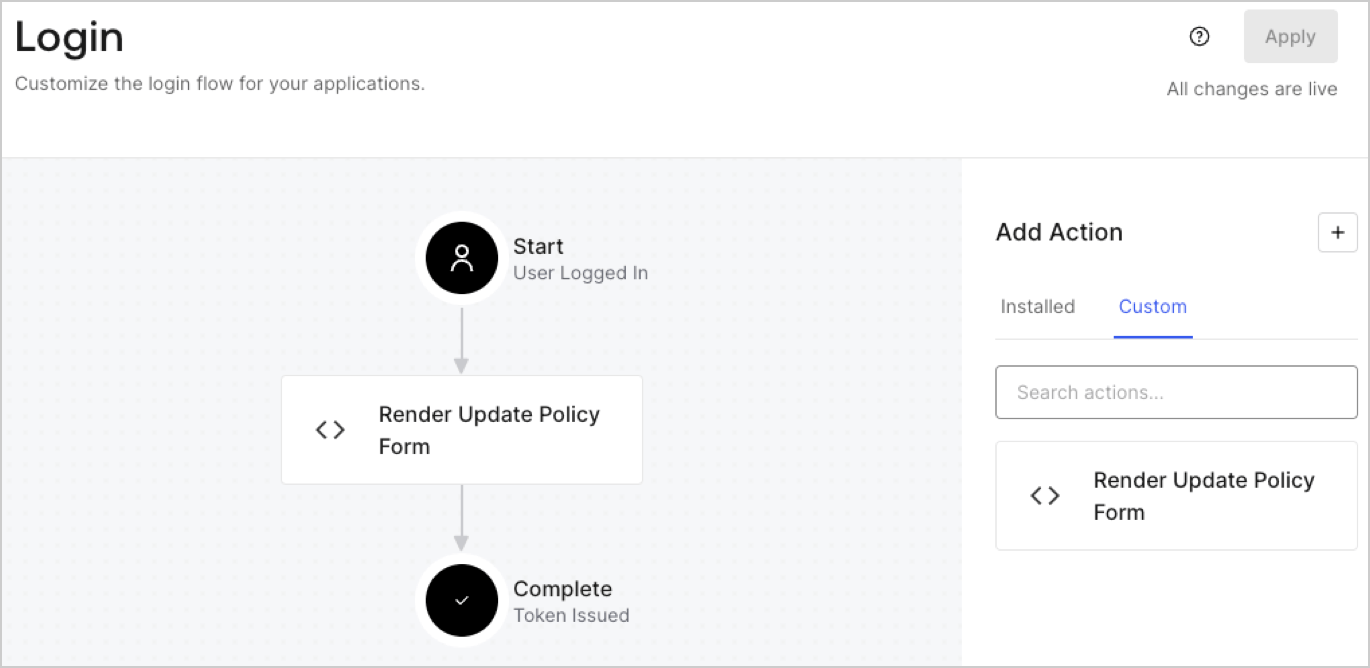
1. Navigate to **Auth0 Dashboard > Actions > Flows > Login.**
2. Select the **+** icon and Select **Build from scratch**:

   * **Name**: Enter `Render Update Policy Form`.
   * **Trigger**: Select `Login / Post Login`.
   * **Runtime**: Select the recommended version.
3. Select **Create**.

To configure the post-login Action:

1. Delete the existing code from the Code editor.
2. Paste the form render code into the Code editor.
3. Edit the code to define the conditional logic that will render the form.

   ```javascript lines theme={null}
   /**
   * @param {Event} event - Details about the user and the context in which they are logging in.
   * @param {PostLoginAPI} api - Interface whose methods can be used to change the behavior of the login.
   */
   exports.onExecutePostLogin = async (event, api) => {
     const FORM_ID = 'REPLACE_WITH_YOUR_FORM_ID';

     if (event.user.app_metadata.privacy_policies !== true) {
       api.prompt.render(FORM_ID);
     }
   }

   exports.onContinuePostLogin = async (event, api) => { }
   ```

   <Callout icon="file-lines" color="#0EA5E9" iconType="regular">
     The example code above will render the form when a user is missing the app metadata `privacy_policies` property.
   </Callout>
4. Select **Deploy.**
5. Drag and Drop the **Render Update Policy Form** Action to the **Login** flow.
   <Frame>
     <img src="https://mintcdn.com/docs-dev-feat-one-trust-integration/llz1i1TZbO7PJIIJ/docs/images/cdy7uua7fh8z/5TOwDgevZsBqd7yZynUYWU/41ca909dc3007aed4f40ff794a05efa5/postlogin.png?fit=max&auto=format&n=llz1i1TZbO7PJIIJ&q=85&s=14b5a6c4e3b4f5ea382bd3cf84cee0ca" alt="Dashboard > Forms > Use Case > Render update policy form login action" data-og-width="1370" width="1370" data-og-height="668" height="668" data-path="docs/images/cdy7uua7fh8z/5TOwDgevZsBqd7yZynUYWU/41ca909dc3007aed4f40ff794a05efa5/postlogin.png" data-optimize="true" data-opv="3" srcset="https://mintcdn.com/docs-dev-feat-one-trust-integration/llz1i1TZbO7PJIIJ/docs/images/cdy7uua7fh8z/5TOwDgevZsBqd7yZynUYWU/41ca909dc3007aed4f40ff794a05efa5/postlogin.png?w=280&fit=max&auto=format&n=llz1i1TZbO7PJIIJ&q=85&s=f3b4ca69751a05219085f4c583993c46 280w, https://mintcdn.com/docs-dev-feat-one-trust-integration/llz1i1TZbO7PJIIJ/docs/images/cdy7uua7fh8z/5TOwDgevZsBqd7yZynUYWU/41ca909dc3007aed4f40ff794a05efa5/postlogin.png?w=560&fit=max&auto=format&n=llz1i1TZbO7PJIIJ&q=85&s=8015524f0750f0cf1e87961246638c79 560w, https://mintcdn.com/docs-dev-feat-one-trust-integration/llz1i1TZbO7PJIIJ/docs/images/cdy7uua7fh8z/5TOwDgevZsBqd7yZynUYWU/41ca909dc3007aed4f40ff794a05efa5/postlogin.png?w=840&fit=max&auto=format&n=llz1i1TZbO7PJIIJ&q=85&s=84cdfecdaff02e70be3cda33d71c6eb7 840w, https://mintcdn.com/docs-dev-feat-one-trust-integration/llz1i1TZbO7PJIIJ/docs/images/cdy7uua7fh8z/5TOwDgevZsBqd7yZynUYWU/41ca909dc3007aed4f40ff794a05efa5/postlogin.png?w=1100&fit=max&auto=format&n=llz1i1TZbO7PJIIJ&q=85&s=19412e5a6cb3842e50efc904baa923c3 1100w, https://mintcdn.com/docs-dev-feat-one-trust-integration/llz1i1TZbO7PJIIJ/docs/images/cdy7uua7fh8z/5TOwDgevZsBqd7yZynUYWU/41ca909dc3007aed4f40ff794a05efa5/postlogin.png?w=1650&fit=max&auto=format&n=llz1i1TZbO7PJIIJ&q=85&s=b3046c8b79e7fb980db57bb32238fc21 1650w, https://mintcdn.com/docs-dev-feat-one-trust-integration/llz1i1TZbO7PJIIJ/docs/images/cdy7uua7fh8z/5TOwDgevZsBqd7yZynUYWU/41ca909dc3007aed4f40ff794a05efa5/postlogin.png?w=2500&fit=max&auto=format&n=llz1i1TZbO7PJIIJ&q=85&s=6ad5781c53a2cfc0c70ad0ae189a53d4 2500w" />
   </Frame>
6. Select **Apply.**

### Test implementation

Test the implementation by following these steps:

1. Log in with an existing user whose app`_metadata` attribute `privacy_policies` does not have a value.
2. The post-login Action in the Login flow will render the form and prompt for acceptance.
3. Select **Auth0 Dashboard > User Management > Users,** locate the user and verify that the `app_metadata` attribute `privacy_policies` contains a `true` value and a timestamp.
