> ## Documentation Index
> Fetch the complete documentation index at: https://docs-dev-feat-one-trust-integration.mintlify.site/llms.txt
> Use this file to discover all available pages before exploring further.

> Describes how to create custom messages and translations with Forms.

# Custom Messages and Translation

You can  customize Form messages to provide your users with a unique Form experience. In addition, you can translate form components, errors, and other custom messages into other languages for a localized experience.

## Messages

Through the Form editor, you can customize error messages and create other custom messages for your users.

### Error messages

You can create custom error messages to replace the default error messages of your forms.

To create custom error messages, follow the steps below:

1. On the Auth0 Dashboard, navigate to **Actions > Forms**.
2. Select **Messages** from the left menu of the Form editor.
3. Select the **Errors** tab\*\*.\*\*
4. Enter your custom error messages in the appropriate fields to replace the default messages.
5. Select **Publish** to save.

### Custom messages

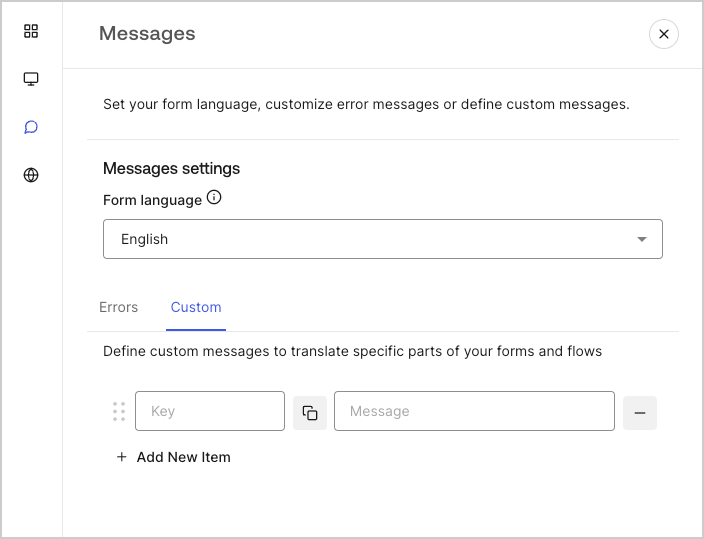
You can create custom messages to add to the default messages for an even further personalized Form experience. For example, you can add a custom message that displays to users when an action returns an error in a flow.

#### Create custom messages

To create custom messages, follow the steps below:

1. From the left menu of the Form editor, select **Messages**.
2. Select the **Custom** tab.Then, select **Add New Item**.
3. To the left, add a unique key for your message\*\*.\*\* Then\*\*, enter\*\* your custom message in the field to the right.
4. Select **Publish** to save.
<Frame>
  <img src="https://mintcdn.com/docs-dev-feat-one-trust-integration/4BnowEk5h1zBwcWW/docs/images/cdy7uua7fh8z/1upBOwWqntPPQF8fqGeN6T/a65674d05c823c5fbe703265558693e4/custom-message.png?fit=max&auto=format&n=4BnowEk5h1zBwcWW&q=85&s=d933ca8d298f003b52985bcfc450073f" alt="Dashboard > Forms > Custom messages and translations > Custom message" data-og-width="704" width="704" data-og-height="539" height="539" data-path="docs/images/cdy7uua7fh8z/1upBOwWqntPPQF8fqGeN6T/a65674d05c823c5fbe703265558693e4/custom-message.png" data-optimize="true" data-opv="3" srcset="https://mintcdn.com/docs-dev-feat-one-trust-integration/4BnowEk5h1zBwcWW/docs/images/cdy7uua7fh8z/1upBOwWqntPPQF8fqGeN6T/a65674d05c823c5fbe703265558693e4/custom-message.png?w=280&fit=max&auto=format&n=4BnowEk5h1zBwcWW&q=85&s=b882d0888c5594cc6003a071a99d1e10 280w, https://mintcdn.com/docs-dev-feat-one-trust-integration/4BnowEk5h1zBwcWW/docs/images/cdy7uua7fh8z/1upBOwWqntPPQF8fqGeN6T/a65674d05c823c5fbe703265558693e4/custom-message.png?w=560&fit=max&auto=format&n=4BnowEk5h1zBwcWW&q=85&s=a16d63204b05c7abe3588665bdf8f727 560w, https://mintcdn.com/docs-dev-feat-one-trust-integration/4BnowEk5h1zBwcWW/docs/images/cdy7uua7fh8z/1upBOwWqntPPQF8fqGeN6T/a65674d05c823c5fbe703265558693e4/custom-message.png?w=840&fit=max&auto=format&n=4BnowEk5h1zBwcWW&q=85&s=d34135f3b94cc85965248a45154f6215 840w, https://mintcdn.com/docs-dev-feat-one-trust-integration/4BnowEk5h1zBwcWW/docs/images/cdy7uua7fh8z/1upBOwWqntPPQF8fqGeN6T/a65674d05c823c5fbe703265558693e4/custom-message.png?w=1100&fit=max&auto=format&n=4BnowEk5h1zBwcWW&q=85&s=05ecd6b486e3c90536ec032b929be7f4 1100w, https://mintcdn.com/docs-dev-feat-one-trust-integration/4BnowEk5h1zBwcWW/docs/images/cdy7uua7fh8z/1upBOwWqntPPQF8fqGeN6T/a65674d05c823c5fbe703265558693e4/custom-message.png?w=1650&fit=max&auto=format&n=4BnowEk5h1zBwcWW&q=85&s=4885d3bb7f1627a87b095705081b3a59 1650w, https://mintcdn.com/docs-dev-feat-one-trust-integration/4BnowEk5h1zBwcWW/docs/images/cdy7uua7fh8z/1upBOwWqntPPQF8fqGeN6T/a65674d05c823c5fbe703265558693e4/custom-message.png?w=2500&fit=max&auto=format&n=4BnowEk5h1zBwcWW&q=85&s=c6be6afa25a71617d3225ef800861702 2500w" />
</Frame>

#### Add custom messages to your forms

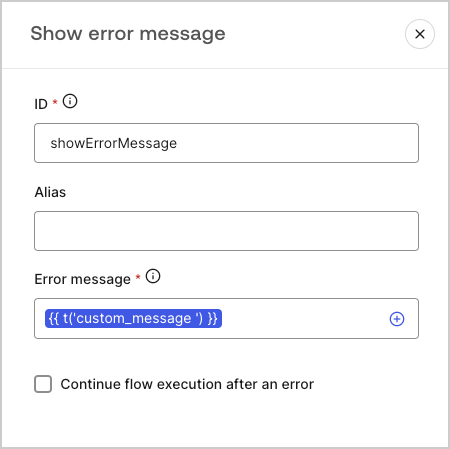
To reference your custom messages in your forms, use the function `{{t('custom_unique_key')}}` with the custom message unique key.
<Frame>
  <img src="https://mintcdn.com/docs-dev-feat-one-trust-integration/Ok22_UbPqdwVqS6m/docs/images/cdy7uua7fh8z/45p4V7w5gw7DQZyJ08ECSH/d040720d9aa19f6e97e21defcd428e55/translation-function.png?fit=max&auto=format&n=Ok22_UbPqdwVqS6m&q=85&s=1925f7ea0e43c16c9679cb342bfdee47" alt="Dashboard > Forms > Custom messages and translations > Translation function" data-og-width="450" width="450" data-og-height="449" height="449" data-path="docs/images/cdy7uua7fh8z/45p4V7w5gw7DQZyJ08ECSH/d040720d9aa19f6e97e21defcd428e55/translation-function.png" data-optimize="true" data-opv="3" srcset="https://mintcdn.com/docs-dev-feat-one-trust-integration/Ok22_UbPqdwVqS6m/docs/images/cdy7uua7fh8z/45p4V7w5gw7DQZyJ08ECSH/d040720d9aa19f6e97e21defcd428e55/translation-function.png?w=280&fit=max&auto=format&n=Ok22_UbPqdwVqS6m&q=85&s=e27f9c6b24f86e7077614363d6232f2b 280w, https://mintcdn.com/docs-dev-feat-one-trust-integration/Ok22_UbPqdwVqS6m/docs/images/cdy7uua7fh8z/45p4V7w5gw7DQZyJ08ECSH/d040720d9aa19f6e97e21defcd428e55/translation-function.png?w=560&fit=max&auto=format&n=Ok22_UbPqdwVqS6m&q=85&s=3cd986171d89f5954deb26a0b96a2f67 560w, https://mintcdn.com/docs-dev-feat-one-trust-integration/Ok22_UbPqdwVqS6m/docs/images/cdy7uua7fh8z/45p4V7w5gw7DQZyJ08ECSH/d040720d9aa19f6e97e21defcd428e55/translation-function.png?w=840&fit=max&auto=format&n=Ok22_UbPqdwVqS6m&q=85&s=14ab7ef50c252959507b1aec8d7763a6 840w, https://mintcdn.com/docs-dev-feat-one-trust-integration/Ok22_UbPqdwVqS6m/docs/images/cdy7uua7fh8z/45p4V7w5gw7DQZyJ08ECSH/d040720d9aa19f6e97e21defcd428e55/translation-function.png?w=1100&fit=max&auto=format&n=Ok22_UbPqdwVqS6m&q=85&s=2ba41aaf6f098170f0a507518ce7cffd 1100w, https://mintcdn.com/docs-dev-feat-one-trust-integration/Ok22_UbPqdwVqS6m/docs/images/cdy7uua7fh8z/45p4V7w5gw7DQZyJ08ECSH/d040720d9aa19f6e97e21defcd428e55/translation-function.png?w=1650&fit=max&auto=format&n=Ok22_UbPqdwVqS6m&q=85&s=076ce48bcbdd54939b9c8d5a65a4b16a 1650w, https://mintcdn.com/docs-dev-feat-one-trust-integration/Ok22_UbPqdwVqS6m/docs/images/cdy7uua7fh8z/45p4V7w5gw7DQZyJ08ECSH/d040720d9aa19f6e97e21defcd428e55/translation-function.png?w=2500&fit=max&auto=format&n=Ok22_UbPqdwVqS6m&q=85&s=4d60d5d0ec58813784502fb49bdd62e1 2500w" />
</Frame>

## Translations

You can use the Translations feature to create an international user experience of your forms. This feature leverages a user’s browser language to determine the appropriate language for your forms.
By default, translations for some standard error messages are provided in Spanish. However, to promote a quality user experience, you can define the translations for your form components, errors, and custom messages in the language of your choice.

To enable translations, follow the steps below:

1. On the Auth0 Dashboard, navigate to **Actions > Forms**.
2. Select **Translations** from the left menu of the Form editor.
3. Check **Enable additional languages**.
4. Select the desired languages from the **Additional languages** dropdown menu.

### Translate messages

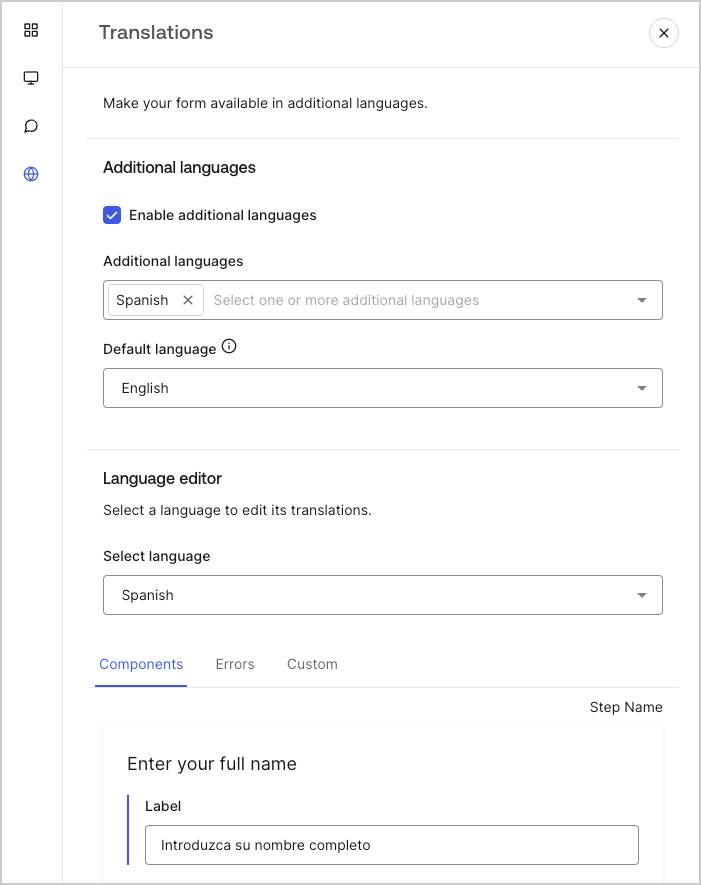
With the language editor, you can define translations for your form components, errors, and other custom messages.

To define your translations, follow the steps below:

1. Select the desired language from theSelect language dropdown menu.
2. Select one of the following tabs to begin defining your translations:

   1. **Components**
   2. **Errors**
   3. **Custom**
3. For each available field, provide your translations as needed.
4. Select **Publish** to save.
<Frame>
  <img src="https://mintcdn.com/docs-dev-feat-one-trust-integration/UhycnN7Dv2VF4a64/docs/images/cdy7uua7fh8z/5HY9FA6HZct2XNv5K4pCHY/c5977a7825e15285c3d77c2ca1e299a8/translation-message.png?fit=max&auto=format&n=UhycnN7Dv2VF4a64&q=85&s=9cc59155e3c406525fbfe5884a9c8f5b" alt="Dashboard > Forms > Custom messages and translations > Translation message" data-og-width="701" width="701" data-og-height="885" height="885" data-path="docs/images/cdy7uua7fh8z/5HY9FA6HZct2XNv5K4pCHY/c5977a7825e15285c3d77c2ca1e299a8/translation-message.png" data-optimize="true" data-opv="3" srcset="https://mintcdn.com/docs-dev-feat-one-trust-integration/UhycnN7Dv2VF4a64/docs/images/cdy7uua7fh8z/5HY9FA6HZct2XNv5K4pCHY/c5977a7825e15285c3d77c2ca1e299a8/translation-message.png?w=280&fit=max&auto=format&n=UhycnN7Dv2VF4a64&q=85&s=21095f93e4f1b63c23bebd76b2d63bb6 280w, https://mintcdn.com/docs-dev-feat-one-trust-integration/UhycnN7Dv2VF4a64/docs/images/cdy7uua7fh8z/5HY9FA6HZct2XNv5K4pCHY/c5977a7825e15285c3d77c2ca1e299a8/translation-message.png?w=560&fit=max&auto=format&n=UhycnN7Dv2VF4a64&q=85&s=24887da5bc3b62a11368c57ad5688cb3 560w, https://mintcdn.com/docs-dev-feat-one-trust-integration/UhycnN7Dv2VF4a64/docs/images/cdy7uua7fh8z/5HY9FA6HZct2XNv5K4pCHY/c5977a7825e15285c3d77c2ca1e299a8/translation-message.png?w=840&fit=max&auto=format&n=UhycnN7Dv2VF4a64&q=85&s=f950e97883a2556e5f47d8ac1cf9c44f 840w, https://mintcdn.com/docs-dev-feat-one-trust-integration/UhycnN7Dv2VF4a64/docs/images/cdy7uua7fh8z/5HY9FA6HZct2XNv5K4pCHY/c5977a7825e15285c3d77c2ca1e299a8/translation-message.png?w=1100&fit=max&auto=format&n=UhycnN7Dv2VF4a64&q=85&s=cd0d4ef1196b2fdb1229ff4e42d84119 1100w, https://mintcdn.com/docs-dev-feat-one-trust-integration/UhycnN7Dv2VF4a64/docs/images/cdy7uua7fh8z/5HY9FA6HZct2XNv5K4pCHY/c5977a7825e15285c3d77c2ca1e299a8/translation-message.png?w=1650&fit=max&auto=format&n=UhycnN7Dv2VF4a64&q=85&s=a86d469c44e54a5a9143df9b0aa56a9b 1650w, https://mintcdn.com/docs-dev-feat-one-trust-integration/UhycnN7Dv2VF4a64/docs/images/cdy7uua7fh8z/5HY9FA6HZct2XNv5K4pCHY/c5977a7825e15285c3d77c2ca1e299a8/translation-message.png?w=2500&fit=max&auto=format&n=UhycnN7Dv2VF4a64&q=85&s=44715f0fde36a47e42e610ebb1e1f8ca 2500w" />
</Frame>
