> ## Documentation Index
> Fetch the complete documentation index at: https://docs-dev-feat-one-trust-integration.mintlify.site/llms.txt
> Use this file to discover all available pages before exploring further.

# Variables et fonctions utilitaires

> Apprenez à utiliser les variables dans les Formulaires pour les Actions.

Les variables vous permettent d’accéder aux données contenues dans les Formulaires et les Flux pour créer une logique commerciale et des automatismes personnalisés.

Voici quelques considérations de base sur l’utilisation des variables :

* Les variables sont entourées d’accolades `{{ variable }}`.
* Si une variable n’existe pas ou ne peut pas être résolue, elle a le même effet qu’une variable dont la valeur est `undefined (indéfini)`.
* Vous pouvez utiliser des opérateurs nuls pour gérer les variables dont la valeur est `null` ou `undefined`, par exemple :`{{fields.foo ?? fields.bar}}`.

## Variables disponibles

Vous pouvez utiliser différents types de variables pour référencer et transformer les données que vous recueillez auprès des clients avec les Formulaires et les Flux.

| Variable                   | \_Syntax          | Where              | Description                                                                  |
| -------------------------- | ----------------- | ------------------ | ---------------------------------------------------------------------------- |
| Contexte                   | `{{contexte.*}}`  | Formes / Flux      | Données contextuelles de référence de la transaction en cours                |
| Champs de formulaire       | `{{fields. *}}`   | Formulaires / Flux | Données de référence des champs de votre formulaire et des champs cachés     |
| Variables partagées        | `{{vars.*}}`      | Formulaires / Flux | Données de référence stockées en tant que variables partagées                |
| Sortie des actions de flux | `{{actions. *}}`  | Flux               | Données de référence de la réponse de sortie des actions de flux précédentes |
| Fonctions d’aide           | `{{fonctions.*}}` | Formulaires / Flux | Fonctions d’aide pour transformer les données                                |

### Variables de contexte

Les Formulaires et les Flux héritent automatiquement des variables de contexte de la transaction en cours. Vous pouvez accéder aux variables de contexte suivantes :

* L’objet `user`, avec accès aux propriétés suivantes :

  * `user.user_id`
  * `user.username`
  * `user.name`
  * `user.given_name`
  * `user.family_name`
  * `user.nickname`
  * `user.email`
  * `user.email_verified`
  * `user.phone_number`
  * `user.phone_verified`
  * `user.picture`
  * `user.user_metadata`
  * `user.app_metadata`
  * `user.created_at`
  * `user.updated_at`
  * `user.last_password_reset`
  * `user.identities`
* L’objet `organization`, avec accès aux propriétés suivantes :

  * `organization.id`
  * `organization.name`
  * `organization.display_name`
  * `organization.metadata`
* L’objet `client`, avec accès aux propriétés suivantes :

  * `client.client_id`
  * `client.name`
* L’objet `tenant (locataire)`, avec accès à la propriété suivante :

  * `tenant.name`
* L’objet `transaction`, avec accès à la propriété suivante :

  * `transaction.state`

<Accordion title="Exemple d’objet contextuel">
  ```json lines theme={null}
  {
    "user": {
      "user_id": "auth0|658409...",
      "name": "ana@travel0.com",
      "nickname": "ana",
      "email": "ana@travel0.com",
      "email_verified": true,
      "picture": "https://s.gravatar.com/avatar/8eb1b522f6...",
      "user_metadata": {},
      "app_metadata": {},
      "created_at": "2023-12-21T09:46:40.487Z",
      "updated_at": "2024-05-07T10:44:26.271Z",
      "last_password_reset": "2023-12-21T09:49:08.932Z",
      "identities": [
        {
          "user_id": "6584...",
          "isSocial": false,
          "provider": "auth0",
          "connection": "Username-Password-Authentication"
        }
      ]
    },
    "client": {
      "client_id": "xpeg5...",
      "name": "My App"
    },
    "tenant": {
      "name": "tenant-testing"
    },
    "transaction": {
      "state": "hKFo2SBId2M0..."
    }
  }
  ```
</Accordion>

Par exemple :  `{{context.user.user_id}}` référence `user_id` de l’objet `user`.

<Frame>
  <img src="https://mintcdn.com/docs-dev-feat-one-trust-integration/__jN7QoGd-FxCG_B/docs/images/fr-ca/cdy7uua7fh8z/3B8DRhXO2wGqeqSFb8KbQv/0a61cdbbb7f1d290950a2ddb9857aac3/Contex-variable.png?fit=max&auto=format&n=__jN7QoGd-FxCG_B&q=85&s=734e24d996aab9d7c62fd0d4edb4689f" alt="Dashboard > Forms > Flows" data-og-width="1141" width="1141" data-og-height="219" height="219" data-path="docs/images/fr-ca/cdy7uua7fh8z/3B8DRhXO2wGqeqSFb8KbQv/0a61cdbbb7f1d290950a2ddb9857aac3/Contex-variable.png" data-optimize="true" data-opv="3" srcset="https://mintcdn.com/docs-dev-feat-one-trust-integration/__jN7QoGd-FxCG_B/docs/images/fr-ca/cdy7uua7fh8z/3B8DRhXO2wGqeqSFb8KbQv/0a61cdbbb7f1d290950a2ddb9857aac3/Contex-variable.png?w=280&fit=max&auto=format&n=__jN7QoGd-FxCG_B&q=85&s=bd34a739fff7fc59a8dc3af4c79ab73a 280w, https://mintcdn.com/docs-dev-feat-one-trust-integration/__jN7QoGd-FxCG_B/docs/images/fr-ca/cdy7uua7fh8z/3B8DRhXO2wGqeqSFb8KbQv/0a61cdbbb7f1d290950a2ddb9857aac3/Contex-variable.png?w=560&fit=max&auto=format&n=__jN7QoGd-FxCG_B&q=85&s=5fac2e604c083ab98e9c91233c7681e3 560w, https://mintcdn.com/docs-dev-feat-one-trust-integration/__jN7QoGd-FxCG_B/docs/images/fr-ca/cdy7uua7fh8z/3B8DRhXO2wGqeqSFb8KbQv/0a61cdbbb7f1d290950a2ddb9857aac3/Contex-variable.png?w=840&fit=max&auto=format&n=__jN7QoGd-FxCG_B&q=85&s=681f4f6c3f68f54cb617b465fbc3a58c 840w, https://mintcdn.com/docs-dev-feat-one-trust-integration/__jN7QoGd-FxCG_B/docs/images/fr-ca/cdy7uua7fh8z/3B8DRhXO2wGqeqSFb8KbQv/0a61cdbbb7f1d290950a2ddb9857aac3/Contex-variable.png?w=1100&fit=max&auto=format&n=__jN7QoGd-FxCG_B&q=85&s=b95af10cc2249f5281e34adce8db8d4a 1100w, https://mintcdn.com/docs-dev-feat-one-trust-integration/__jN7QoGd-FxCG_B/docs/images/fr-ca/cdy7uua7fh8z/3B8DRhXO2wGqeqSFb8KbQv/0a61cdbbb7f1d290950a2ddb9857aac3/Contex-variable.png?w=1650&fit=max&auto=format&n=__jN7QoGd-FxCG_B&q=85&s=4c30804bbb0f2878ed8f201044d1bbaf 1650w, https://mintcdn.com/docs-dev-feat-one-trust-integration/__jN7QoGd-FxCG_B/docs/images/fr-ca/cdy7uua7fh8z/3B8DRhXO2wGqeqSFb8KbQv/0a61cdbbb7f1d290950a2ddb9857aac3/Contex-variable.png?w=2500&fit=max&auto=format&n=__jN7QoGd-FxCG_B&q=85&s=36ffee0864fa940fa792a4349a469d8e 2500w" />
</Frame>

### Variables des champs du formulaire

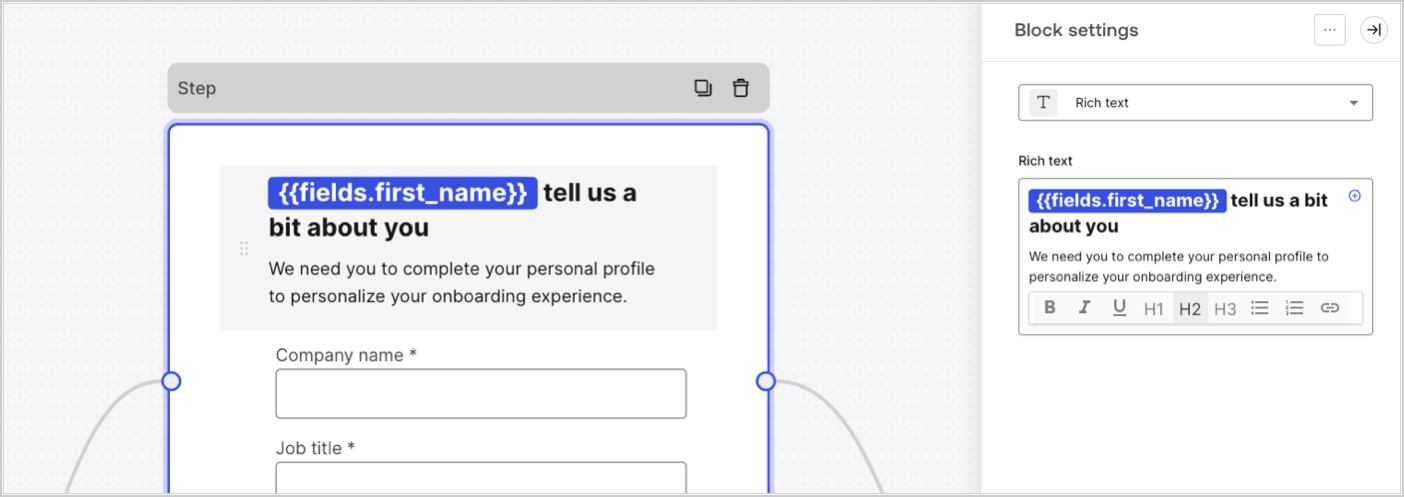
Les variables de champ contiennent les données recueillies auprès de l’utilisateur dans les champs de saisie du formulaire et les données des champs cachés. Les données de chaque champ varient en fonction du type de champ. Par exemple : `{{fields.first_name}}` référence la valeur saisie dans le champ ayant l’ID `first_name`.
<Frame>
  <img src="https://mintcdn.com/docs-dev-feat-one-trust-integration/Dtakz8xNQklEiwAZ/docs/images/fr-ca/cdy7uua7fh8z/4D42A6ww4XvFxweoxh04Rd/016c2ed9d25bc2267ed3ed31bf8b2bf6/form-fields-variable.png?fit=max&auto=format&n=Dtakz8xNQklEiwAZ&q=85&s=e28bce17ff70a4991fc52eae596610b8" alt="Dashboard > Actions > Forms > Form" data-og-width="1404" width="1404" data-og-height="497" height="497" data-path="docs/images/fr-ca/cdy7uua7fh8z/4D42A6ww4XvFxweoxh04Rd/016c2ed9d25bc2267ed3ed31bf8b2bf6/form-fields-variable.png" data-optimize="true" data-opv="3" srcset="https://mintcdn.com/docs-dev-feat-one-trust-integration/Dtakz8xNQklEiwAZ/docs/images/fr-ca/cdy7uua7fh8z/4D42A6ww4XvFxweoxh04Rd/016c2ed9d25bc2267ed3ed31bf8b2bf6/form-fields-variable.png?w=280&fit=max&auto=format&n=Dtakz8xNQklEiwAZ&q=85&s=8e8f0d629b11da047d5983a3ff6d7d99 280w, https://mintcdn.com/docs-dev-feat-one-trust-integration/Dtakz8xNQklEiwAZ/docs/images/fr-ca/cdy7uua7fh8z/4D42A6ww4XvFxweoxh04Rd/016c2ed9d25bc2267ed3ed31bf8b2bf6/form-fields-variable.png?w=560&fit=max&auto=format&n=Dtakz8xNQklEiwAZ&q=85&s=a62775c417403a0a7ba4c6aeddf5ff39 560w, https://mintcdn.com/docs-dev-feat-one-trust-integration/Dtakz8xNQklEiwAZ/docs/images/fr-ca/cdy7uua7fh8z/4D42A6ww4XvFxweoxh04Rd/016c2ed9d25bc2267ed3ed31bf8b2bf6/form-fields-variable.png?w=840&fit=max&auto=format&n=Dtakz8xNQklEiwAZ&q=85&s=021dffed37b821401ee7f6fd0d133556 840w, https://mintcdn.com/docs-dev-feat-one-trust-integration/Dtakz8xNQklEiwAZ/docs/images/fr-ca/cdy7uua7fh8z/4D42A6ww4XvFxweoxh04Rd/016c2ed9d25bc2267ed3ed31bf8b2bf6/form-fields-variable.png?w=1100&fit=max&auto=format&n=Dtakz8xNQklEiwAZ&q=85&s=1624443ca2d2acf1ec9d34450e324f3c 1100w, https://mintcdn.com/docs-dev-feat-one-trust-integration/Dtakz8xNQklEiwAZ/docs/images/fr-ca/cdy7uua7fh8z/4D42A6ww4XvFxweoxh04Rd/016c2ed9d25bc2267ed3ed31bf8b2bf6/form-fields-variable.png?w=1650&fit=max&auto=format&n=Dtakz8xNQklEiwAZ&q=85&s=6d57fe4b1221f1c9dae258abc1204aa9 1650w, https://mintcdn.com/docs-dev-feat-one-trust-integration/Dtakz8xNQklEiwAZ/docs/images/fr-ca/cdy7uua7fh8z/4D42A6ww4XvFxweoxh04Rd/016c2ed9d25bc2267ed3ed31bf8b2bf6/form-fields-variable.png?w=2500&fit=max&auto=format&n=Dtakz8xNQklEiwAZ&q=85&s=00197aa79268e0f5d850fce7a642bf59 2500w" />
</Frame>

### Variables des actions de sortie de flux

Lorsqu’une action de flux est exécutée, elle génère un objet qui peut être référencé dans les actions suivantes. Par exemple : `{{actions.generate_otp.code}}` référence le code résultant de l’action avec l’ID`generate_otp`.

<Frame>
  <img src="https://mintcdn.com/docs-dev-feat-one-trust-integration/zZA8afkXluB-BQ7B/docs/images/fr-ca/cdy7uua7fh8z/6jYtEdYqSGXm3DDv0mxQ0o/2d48012629745e07137bf6ba42f4d829/flow-output-variable.png?fit=max&auto=format&n=zZA8afkXluB-BQ7B&q=85&s=0266a96fe2d492c924af743f883b807d" alt="Dashboard > Actions > Forms > Flows" data-og-width="1404" width="1404" data-og-height="253" height="253" data-path="docs/images/fr-ca/cdy7uua7fh8z/6jYtEdYqSGXm3DDv0mxQ0o/2d48012629745e07137bf6ba42f4d829/flow-output-variable.png" data-optimize="true" data-opv="3" srcset="https://mintcdn.com/docs-dev-feat-one-trust-integration/zZA8afkXluB-BQ7B/docs/images/fr-ca/cdy7uua7fh8z/6jYtEdYqSGXm3DDv0mxQ0o/2d48012629745e07137bf6ba42f4d829/flow-output-variable.png?w=280&fit=max&auto=format&n=zZA8afkXluB-BQ7B&q=85&s=d8309bb82b3107c9ad43e92720769996 280w, https://mintcdn.com/docs-dev-feat-one-trust-integration/zZA8afkXluB-BQ7B/docs/images/fr-ca/cdy7uua7fh8z/6jYtEdYqSGXm3DDv0mxQ0o/2d48012629745e07137bf6ba42f4d829/flow-output-variable.png?w=560&fit=max&auto=format&n=zZA8afkXluB-BQ7B&q=85&s=86252fa0daf927be839002a3b22cf8ce 560w, https://mintcdn.com/docs-dev-feat-one-trust-integration/zZA8afkXluB-BQ7B/docs/images/fr-ca/cdy7uua7fh8z/6jYtEdYqSGXm3DDv0mxQ0o/2d48012629745e07137bf6ba42f4d829/flow-output-variable.png?w=840&fit=max&auto=format&n=zZA8afkXluB-BQ7B&q=85&s=c0cb5600b857f43aa0d3b09b42702384 840w, https://mintcdn.com/docs-dev-feat-one-trust-integration/zZA8afkXluB-BQ7B/docs/images/fr-ca/cdy7uua7fh8z/6jYtEdYqSGXm3DDv0mxQ0o/2d48012629745e07137bf6ba42f4d829/flow-output-variable.png?w=1100&fit=max&auto=format&n=zZA8afkXluB-BQ7B&q=85&s=250047eef9e16dde950098288c37159b 1100w, https://mintcdn.com/docs-dev-feat-one-trust-integration/zZA8afkXluB-BQ7B/docs/images/fr-ca/cdy7uua7fh8z/6jYtEdYqSGXm3DDv0mxQ0o/2d48012629745e07137bf6ba42f4d829/flow-output-variable.png?w=1650&fit=max&auto=format&n=zZA8afkXluB-BQ7B&q=85&s=668a8c53fe0231f87bcba7872795d11c 1650w, https://mintcdn.com/docs-dev-feat-one-trust-integration/zZA8afkXluB-BQ7B/docs/images/fr-ca/cdy7uua7fh8z/6jYtEdYqSGXm3DDv0mxQ0o/2d48012629745e07137bf6ba42f4d829/flow-output-variable.png?w=2500&fit=max&auto=format&n=zZA8afkXluB-BQ7B&q=85&s=24fc2e7c6c82b53cb124c92753b694c0 2500w" />
</Frame>

### Variables partagées

Vous pouvez stocker des variables à partager avec des flux ultérieurs ou même avec des composants de formulaire dans la même transaction. Les variables partagées sont éphémères et sont associées à un parcours de formulaire spécifique. Leurs valeurs ne sont pas accessibles en dehors de ce parcours. Par exemple : `{{vars.external_id}}` référence la valeur d’une variable partagée avec l’ID `external_id`.

<Frame>
  <img src="https://mintcdn.com/docs-dev-feat-one-trust-integration/Dtakz8xNQklEiwAZ/docs/images/fr-ca/cdy7uua7fh8z/4571ExRTHL0KZKJKX9pNwj/abb631b8608a6356b0e5b3784cf8b02f/flow-shared-variable.png?fit=max&auto=format&n=Dtakz8xNQklEiwAZ&q=85&s=4eebaa3fd9d17702cb8c8f0f7c7ebb30" alt="Dashboard > Actions > Forms > Flows" data-og-width="1215" width="1215" data-og-height="162" height="162" data-path="docs/images/fr-ca/cdy7uua7fh8z/4571ExRTHL0KZKJKX9pNwj/abb631b8608a6356b0e5b3784cf8b02f/flow-shared-variable.png" data-optimize="true" data-opv="3" srcset="https://mintcdn.com/docs-dev-feat-one-trust-integration/Dtakz8xNQklEiwAZ/docs/images/fr-ca/cdy7uua7fh8z/4571ExRTHL0KZKJKX9pNwj/abb631b8608a6356b0e5b3784cf8b02f/flow-shared-variable.png?w=280&fit=max&auto=format&n=Dtakz8xNQklEiwAZ&q=85&s=5bd51b55f407481c39911b1099956d82 280w, https://mintcdn.com/docs-dev-feat-one-trust-integration/Dtakz8xNQklEiwAZ/docs/images/fr-ca/cdy7uua7fh8z/4571ExRTHL0KZKJKX9pNwj/abb631b8608a6356b0e5b3784cf8b02f/flow-shared-variable.png?w=560&fit=max&auto=format&n=Dtakz8xNQklEiwAZ&q=85&s=1b5e5e9964e58fe31e02ef27be19a00b 560w, https://mintcdn.com/docs-dev-feat-one-trust-integration/Dtakz8xNQklEiwAZ/docs/images/fr-ca/cdy7uua7fh8z/4571ExRTHL0KZKJKX9pNwj/abb631b8608a6356b0e5b3784cf8b02f/flow-shared-variable.png?w=840&fit=max&auto=format&n=Dtakz8xNQklEiwAZ&q=85&s=4ef3c6c81cab2c3782ee601fc99f55af 840w, https://mintcdn.com/docs-dev-feat-one-trust-integration/Dtakz8xNQklEiwAZ/docs/images/fr-ca/cdy7uua7fh8z/4571ExRTHL0KZKJKX9pNwj/abb631b8608a6356b0e5b3784cf8b02f/flow-shared-variable.png?w=1100&fit=max&auto=format&n=Dtakz8xNQklEiwAZ&q=85&s=f72fc7f13bba7aa87e53b2fdfc127802 1100w, https://mintcdn.com/docs-dev-feat-one-trust-integration/Dtakz8xNQklEiwAZ/docs/images/fr-ca/cdy7uua7fh8z/4571ExRTHL0KZKJKX9pNwj/abb631b8608a6356b0e5b3784cf8b02f/flow-shared-variable.png?w=1650&fit=max&auto=format&n=Dtakz8xNQklEiwAZ&q=85&s=51804752a98d9c62739a01647978dccb 1650w, https://mintcdn.com/docs-dev-feat-one-trust-integration/Dtakz8xNQklEiwAZ/docs/images/fr-ca/cdy7uua7fh8z/4571ExRTHL0KZKJKX9pNwj/abb631b8608a6356b0e5b3784cf8b02f/flow-shared-variable.png?w=2500&fit=max&auto=format&n=Dtakz8xNQklEiwAZ&q=85&s=4d1e4ba6b7664303902cb7595864e80a 2500w" />
</Frame>

<Warning>
  Variables partagées :

  * elles sont internes (côté serveur) et ne sont pas exposées au navigateur (côté client).
  * elle peuvent être résolues et exposées au navigateur si vous avez référencé une variable partagée dans le composant de formulaire.
</Warning>

### Fonctions utilitaires

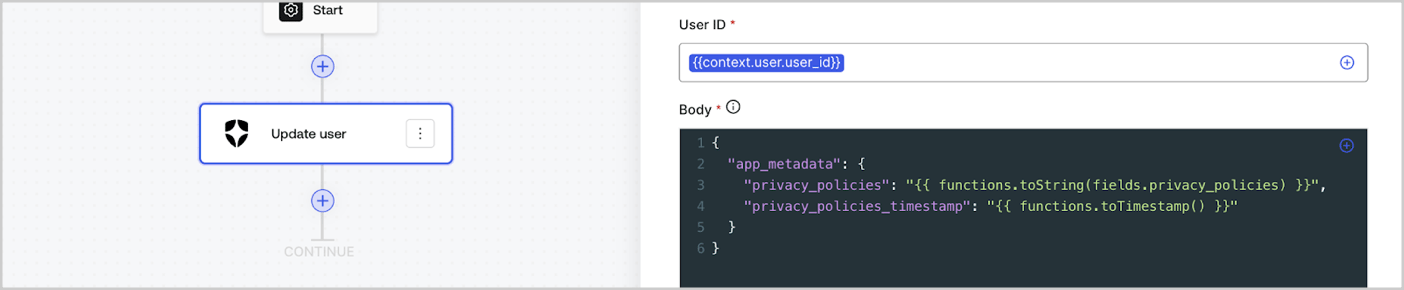
Les fonctions utilitaires permettent de transformer les données et d’effectuer des opérations simples. Par exemple : `{{functions.toString(fields.privacy_policies)}}` transforme la valeur du champ ayant l’ID `privacy_policies` utilisant la fonction `toString()`.
<Frame>
  <img src="https://mintcdn.com/docs-dev-feat-one-trust-integration/dVDZ8136PQNn0Qv8/docs/images/fr-ca/cdy7uua7fh8z/1gyox33XJEtdkT43NppblT/0e878cc5ae2bde11b4207e105bbac6c5/flow-helper-functions.png?fit=max&auto=format&n=dVDZ8136PQNn0Qv8&q=85&s=14382dd5db31149c277ac7cb0781f4d8" alt="Dashboard > Actions > Forms > Flows" data-og-width="1404" width="1404" data-og-height="290" height="290" data-path="docs/images/fr-ca/cdy7uua7fh8z/1gyox33XJEtdkT43NppblT/0e878cc5ae2bde11b4207e105bbac6c5/flow-helper-functions.png" data-optimize="true" data-opv="3" srcset="https://mintcdn.com/docs-dev-feat-one-trust-integration/dVDZ8136PQNn0Qv8/docs/images/fr-ca/cdy7uua7fh8z/1gyox33XJEtdkT43NppblT/0e878cc5ae2bde11b4207e105bbac6c5/flow-helper-functions.png?w=280&fit=max&auto=format&n=dVDZ8136PQNn0Qv8&q=85&s=00c43c272926c6d5dff14ebbd3edf9d8 280w, https://mintcdn.com/docs-dev-feat-one-trust-integration/dVDZ8136PQNn0Qv8/docs/images/fr-ca/cdy7uua7fh8z/1gyox33XJEtdkT43NppblT/0e878cc5ae2bde11b4207e105bbac6c5/flow-helper-functions.png?w=560&fit=max&auto=format&n=dVDZ8136PQNn0Qv8&q=85&s=33b3d040c7794c0f84e8d95ed858973e 560w, https://mintcdn.com/docs-dev-feat-one-trust-integration/dVDZ8136PQNn0Qv8/docs/images/fr-ca/cdy7uua7fh8z/1gyox33XJEtdkT43NppblT/0e878cc5ae2bde11b4207e105bbac6c5/flow-helper-functions.png?w=840&fit=max&auto=format&n=dVDZ8136PQNn0Qv8&q=85&s=89936cf5556b818ffce7451cbc222a9c 840w, https://mintcdn.com/docs-dev-feat-one-trust-integration/dVDZ8136PQNn0Qv8/docs/images/fr-ca/cdy7uua7fh8z/1gyox33XJEtdkT43NppblT/0e878cc5ae2bde11b4207e105bbac6c5/flow-helper-functions.png?w=1100&fit=max&auto=format&n=dVDZ8136PQNn0Qv8&q=85&s=5ec1373afa92cb1581473917123a75ac 1100w, https://mintcdn.com/docs-dev-feat-one-trust-integration/dVDZ8136PQNn0Qv8/docs/images/fr-ca/cdy7uua7fh8z/1gyox33XJEtdkT43NppblT/0e878cc5ae2bde11b4207e105bbac6c5/flow-helper-functions.png?w=1650&fit=max&auto=format&n=dVDZ8136PQNn0Qv8&q=85&s=b575cc8bf6b829f7a5692ce4f2dd8661 1650w, https://mintcdn.com/docs-dev-feat-one-trust-integration/dVDZ8136PQNn0Qv8/docs/images/fr-ca/cdy7uua7fh8z/1gyox33XJEtdkT43NppblT/0e878cc5ae2bde11b4207e105bbac6c5/flow-helper-functions.png?w=2500&fit=max&auto=format&n=dVDZ8136PQNn0Qv8&q=85&s=2a29164c359924a38475bdfb6f988924 2500w" />
</Frame>

Les fonctions utilitaires disponibles sont les suivantes :

| Fonction                               | Description                                                                                                                                                                                                                                                                                   | Exemple                                                                                                          |
| -------------------------------------- | --------------------------------------------------------------------------------------------------------------------------------------------------------------------------------------------------------------------------------------------------------------------------------------------- | ---------------------------------------------------------------------------------------------------------------- |
| toArray(value)                         | Convertit la valeur en un tableau                                                                                                                                                                                                                                                             | {"{{ functions.toArray('abc') }}"} // \['abc']                                                                   |
| toBoolean(value)                       | Convertit la valeur en valeur booléenne                                                                                                                                                                                                                                                       | {"{{ functions.toBoolean(1) }}"} // true<br /><br />{"{{ functions.toBoolean(0) }}"} // false                    |
| length(value)                          | Renvoie la longueur de la valeur du paramètre                                                                                                                                                                                                                                                 | {"{{ functions.length('auth0') }}"} // 5                                                                         |
| mask(value)                            | Masque une valeur pour éviter l’exposition dans les exécutions                                                                                                                                                                                                                                | {"{{ functions.mask('my_awesome_secret') }}"} // ███                                                             |
| toNumber(value)                        | Convertit la valeur en nombre                                                                                                                                                                                                                                                                 | {"{{ functions.toNumber('123') }}"} // 123                                                                       |
| random(min, max, \[boolean])           | Renvoie un nombre aléatoire compris entre les valeurs minimales et maximales incluses.                                                                                                                                                                                                        | {"{{ functions.random(0, 6) }}"} // 4<br /><br />{"{{ functions.random(0, 6, true) }}"} // 3.8523497...          |
| slice(value, start, end)               | Renvoie une section d’un tableau de valeurs ou d’une chaîne de caractères entre les indices de début et de fin.                                                                                                                                                                               | {"{{ functions.slice( 'example', 3, 5) }}"} // 'mp'                                                              |
| toString(value)                        | Convertit la valeur en chaîne                                                                                                                                                                                                                                                                 | {"{{ functions.toString(123) }}"} // '123'                                                                       |
| substring(value, start, end)           | Renvoie une section d’une valeur entre les indices de début et de fin. En savoir plus sur les [différences entre les fonctions slice et substring](https://developer.mozilla.org/en-US/docs/Web/JavaScript/Reference/Global_Objects/String/substring#differences_between_substring_and_slice) | {"{{ functions.substring( 'example', 3, 5) }}"} // 'mp'                                                          |
| toTimestamp()                          | Renvoie l’horodatage UNIX actuel                                                                                                                                                                                                                                                              | {"{{ functions.toTimestamp() }}"} // 1628761483                                                                  |
| toTimestamp(date)                      | Renvoie la date fournie en heure UNIX                                                                                                                                                                                                                                                         | {"{{ functions.toTimestamp('2021-04-30T10:02:50.876Z') }}"} // 1619776970                                        |
| toTimestamp(date)                      | Renvoie la date fournie en heure UNIX                                                                                                                                                                                                                                                         | {"{{ functions.toTimestamp('2021-04-30T10:02:50.876Z') }}"} // 1619776970                                        |
| replaceAll(value, string, replacement) | Renvoie une nouvelle chaîne dans laquelle toutes les correspondances d’un modèle sont remplacées par un substitut.                                                                                                                                                                            | {"{{ functions.replaceall('2021-04-30', '-', '/') }}"} // 2021/04/30                                             |
| replace(value, string, replacement)    | Renvoie une nouvelle chaîne dans laquelle toutes les correspondances d’un modèle sont remplacées par un substitut. Si le motif est une chaîne, seule la première occurrence sera remplacée.                                                                                                   | {"{{ functions.replace('2021-04-30', '-', '/') }}"} // 2021/04-30                                                |
| split(value, separator, limit?)        | Renvoie une liste ordonnée de sous-chaînes divisées par le séparateur.                                                                                                                                                                                                                        | {"{{ functions.split('2021-04-30', '-') }}"} // \['2021', '04', '30']                                            |
| now()                                  | Renvoie la date actuelle au format ISO 8601.                                                                                                                                                                                                                                                  | {"{{ functions.now() }}"} // 2021-04-30T10:31:28.576Z                                                            |
| includes(collection, item, fromIndex?) | Renvoie le fait qu’un tableau contienne une certaine valeur parmi ses entrées.                                                                                                                                                                                                                | {"{{ functions.includes(['auth0', 'identity', 'authentication'], 'identity') }}"} // true                        |
| indexOf(collection, item, fromIndex?)  | Renvoie le premier indice auquel un élément donné peut être trouvé dans le tableau, ou -1 s’il n’est pas présent.                                                                                                                                                                             | {"{{ functions.indexOf(['auth0', 'identity', 'authentication'], 'identity') }}"} // 1                            |
| merge(base, value)                     | Renvoie un tableau fusionné, un objet ou concatène une chaîne de caractères en fonction du type de données de base.                                                                                                                                                                           | {"{{ functions.merge(['auth0', 'identity'], ['authentication']) }}"} // \['auth0', 'identity', 'authentication'] |
| md5(value)                             | Renvoie une valeur hachée MD5.                                                                                                                                                                                                                                                                | {"{{ functions.md5('auth0') }}"} // 7bbb597...                                                                   |
| sha1(value)                            | Renvoie une valeur hachée SHA1.                                                                                                                                                                                                                                                               | {"{{ functions.sha1('auth0') }}"} // b4ec5339...                                                                 |
| sha256(value)                          | Renvoie une valeur hachée SHA256.                                                                                                                                                                                                                                                             | {"{{ functions.sha256('auth0') }}"} // d9082bdc...                                                               |
| sha512(value)                          | Renvoie une valeur hachée SHA512.                                                                                                                                                                                                                                                             | {"{{ functions.sha512('auth0') }}"} // c0d588069d...                                                             |
| uuid()                                 | Renvoie un UUID v4 aléatoire                                                                                                                                                                                                                                                                  | {"{{ functions.uuid() }}"} // 36b8f84d-df4e-4d49-b662-bcde71a8764                                                |

## Meilleures pratiques pour les variables

### Utiliser des ID significatifs

Lorsque vous ajoutez un champ de Formulaire ou une action de Flux, l’ID est automatiquement généré.

Mettez à jour l’ID avec une valeur plus descriptive afin de pouvoir identifier les informations qu’il contient. Par exemple, si vous créez un champ de Formulaire qui stocke le prénom de l’utilisateur, modifiez l’ID en `first_name`.

### Soyez vigilant lorsque vous mettez à jour des ID existants

Si une variable est déjà utilisée et que vous devez modifier son ID, identifiez l’endroit où vous l’avez référencée et mettez l’ID à jour en conséquence pour éviter les valeurs indéfinies ou vides.

### Vérifier l’exécution des Flux

Si vous constatez une valeur de variable inattendue, utilisez l’aperçu [**Executions (Exécutions)**](/docs/fr-ca/customize/forms/flows/flow-execution-and-debugger) pour dépanner la variable.

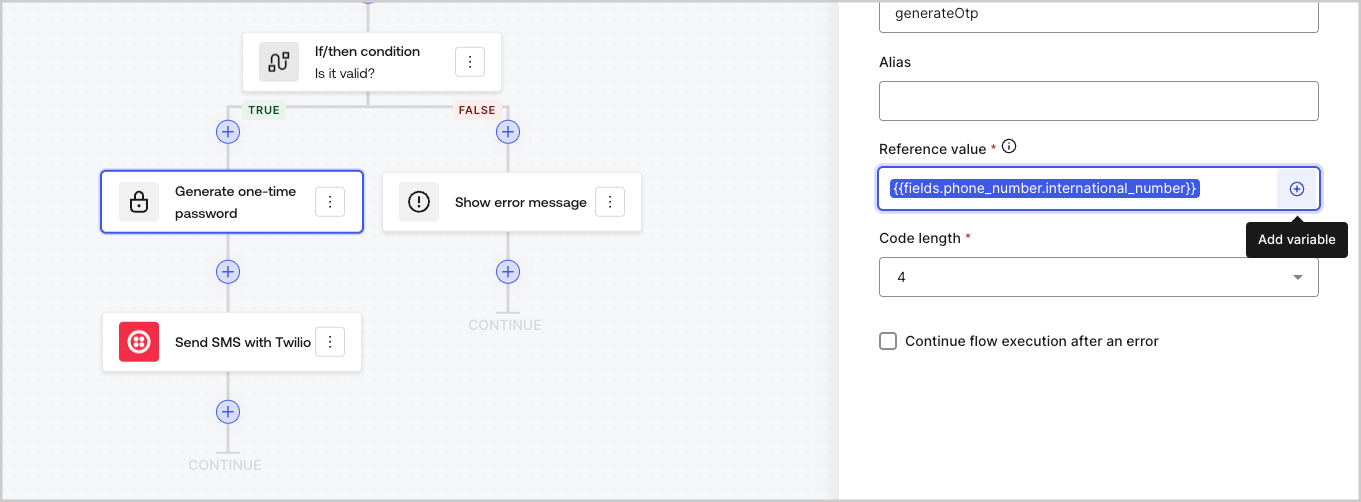
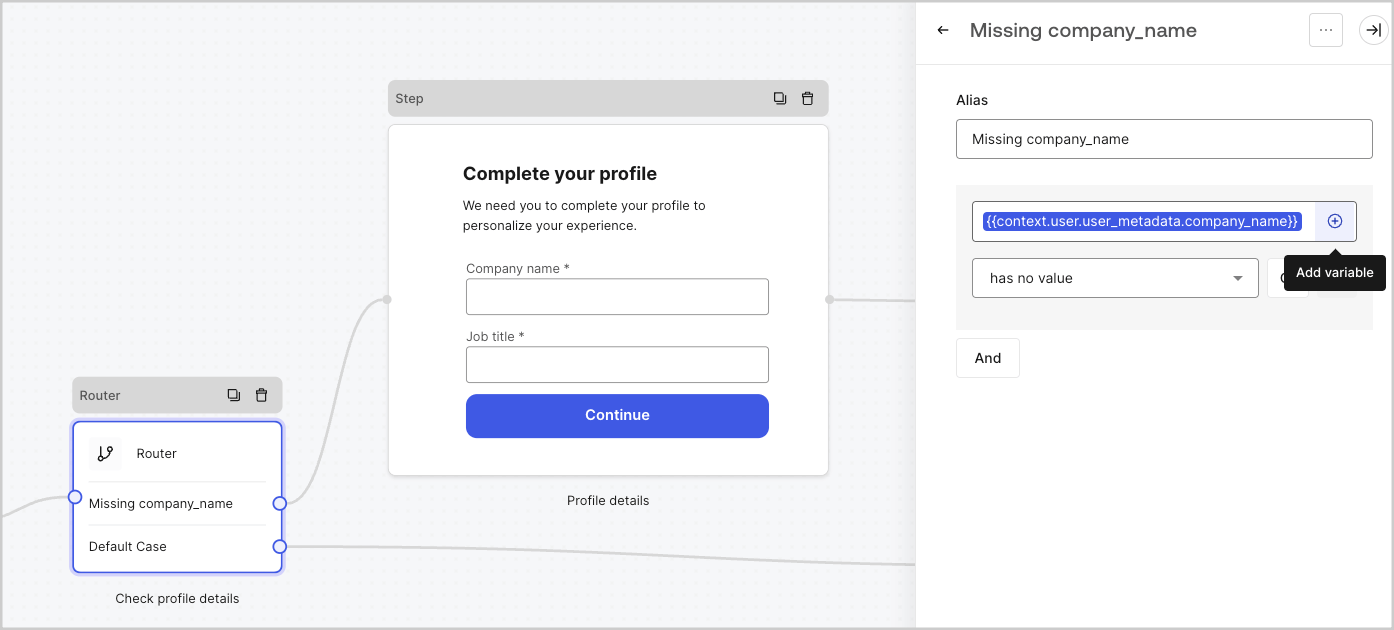
### Utiliser le menu de remplissage automatique

Le menu de remplissage automatique vous aide à localiser et à référencer correctement les variables existantes.
<Frame>
  <img src="https://mintcdn.com/docs-dev-feat-one-trust-integration/__jN7QoGd-FxCG_B/docs/images/fr-ca/cdy7uua7fh8z/3SKnDuaMzSImxZtDDAoZaz/9ea800fad29ef71d1ded3c72b87660a4/Autocomplete-flows.png?fit=max&auto=format&n=__jN7QoGd-FxCG_B&q=85&s=50e7209b60cc3bcfdb038fc8f8ff646d" alt="Dashboard > Actions > Forms > Flows" data-og-width="1361" width="1361" data-og-height="502" height="502" data-path="docs/images/fr-ca/cdy7uua7fh8z/3SKnDuaMzSImxZtDDAoZaz/9ea800fad29ef71d1ded3c72b87660a4/Autocomplete-flows.png" data-optimize="true" data-opv="3" srcset="https://mintcdn.com/docs-dev-feat-one-trust-integration/__jN7QoGd-FxCG_B/docs/images/fr-ca/cdy7uua7fh8z/3SKnDuaMzSImxZtDDAoZaz/9ea800fad29ef71d1ded3c72b87660a4/Autocomplete-flows.png?w=280&fit=max&auto=format&n=__jN7QoGd-FxCG_B&q=85&s=ea59ebdd93eafb295ee1b11cdaece736 280w, https://mintcdn.com/docs-dev-feat-one-trust-integration/__jN7QoGd-FxCG_B/docs/images/fr-ca/cdy7uua7fh8z/3SKnDuaMzSImxZtDDAoZaz/9ea800fad29ef71d1ded3c72b87660a4/Autocomplete-flows.png?w=560&fit=max&auto=format&n=__jN7QoGd-FxCG_B&q=85&s=8fbe5ebcbba817f6a36d681947180bd9 560w, https://mintcdn.com/docs-dev-feat-one-trust-integration/__jN7QoGd-FxCG_B/docs/images/fr-ca/cdy7uua7fh8z/3SKnDuaMzSImxZtDDAoZaz/9ea800fad29ef71d1ded3c72b87660a4/Autocomplete-flows.png?w=840&fit=max&auto=format&n=__jN7QoGd-FxCG_B&q=85&s=2376275fca3ea3355cf298eba2c8a5e5 840w, https://mintcdn.com/docs-dev-feat-one-trust-integration/__jN7QoGd-FxCG_B/docs/images/fr-ca/cdy7uua7fh8z/3SKnDuaMzSImxZtDDAoZaz/9ea800fad29ef71d1ded3c72b87660a4/Autocomplete-flows.png?w=1100&fit=max&auto=format&n=__jN7QoGd-FxCG_B&q=85&s=e8269c137b79d7640c8a3f83ae5fc67b 1100w, https://mintcdn.com/docs-dev-feat-one-trust-integration/__jN7QoGd-FxCG_B/docs/images/fr-ca/cdy7uua7fh8z/3SKnDuaMzSImxZtDDAoZaz/9ea800fad29ef71d1ded3c72b87660a4/Autocomplete-flows.png?w=1650&fit=max&auto=format&n=__jN7QoGd-FxCG_B&q=85&s=16d45ee902ac34ed9958b2fe4990c997 1650w, https://mintcdn.com/docs-dev-feat-one-trust-integration/__jN7QoGd-FxCG_B/docs/images/fr-ca/cdy7uua7fh8z/3SKnDuaMzSImxZtDDAoZaz/9ea800fad29ef71d1ded3c72b87660a4/Autocomplete-flows.png?w=2500&fit=max&auto=format&n=__jN7QoGd-FxCG_B&q=85&s=9e2360e19fe8a54ba8b0ef0895fa1a4b 2500w" />
</Frame>

<Frame>
  <img src="https://mintcdn.com/docs-dev-feat-one-trust-integration/__jN7QoGd-FxCG_B/docs/images/fr-ca/cdy7uua7fh8z/2kjRKozVgrd2a7UJXOANaN/ee5452d7210cd2f13b0e97763f11c82a/Autocomplete-forms.png?fit=max&auto=format&n=__jN7QoGd-FxCG_B&q=85&s=3be1de398f7ddc4890995ef319d5c3bd" alt="Dashboard > Actions > Forms > Form" data-og-width="1394" width="1394" data-og-height="630" height="630" data-path="docs/images/fr-ca/cdy7uua7fh8z/2kjRKozVgrd2a7UJXOANaN/ee5452d7210cd2f13b0e97763f11c82a/Autocomplete-forms.png" data-optimize="true" data-opv="3" srcset="https://mintcdn.com/docs-dev-feat-one-trust-integration/__jN7QoGd-FxCG_B/docs/images/fr-ca/cdy7uua7fh8z/2kjRKozVgrd2a7UJXOANaN/ee5452d7210cd2f13b0e97763f11c82a/Autocomplete-forms.png?w=280&fit=max&auto=format&n=__jN7QoGd-FxCG_B&q=85&s=87117178e1a3df49f99684accc78ff43 280w, https://mintcdn.com/docs-dev-feat-one-trust-integration/__jN7QoGd-FxCG_B/docs/images/fr-ca/cdy7uua7fh8z/2kjRKozVgrd2a7UJXOANaN/ee5452d7210cd2f13b0e97763f11c82a/Autocomplete-forms.png?w=560&fit=max&auto=format&n=__jN7QoGd-FxCG_B&q=85&s=a0562613bee2d086bc211519a78fa316 560w, https://mintcdn.com/docs-dev-feat-one-trust-integration/__jN7QoGd-FxCG_B/docs/images/fr-ca/cdy7uua7fh8z/2kjRKozVgrd2a7UJXOANaN/ee5452d7210cd2f13b0e97763f11c82a/Autocomplete-forms.png?w=840&fit=max&auto=format&n=__jN7QoGd-FxCG_B&q=85&s=b91568ab4ceb0e01046cef719988f38c 840w, https://mintcdn.com/docs-dev-feat-one-trust-integration/__jN7QoGd-FxCG_B/docs/images/fr-ca/cdy7uua7fh8z/2kjRKozVgrd2a7UJXOANaN/ee5452d7210cd2f13b0e97763f11c82a/Autocomplete-forms.png?w=1100&fit=max&auto=format&n=__jN7QoGd-FxCG_B&q=85&s=b6d3407a6b70c381887ec3cc5f05e767 1100w, https://mintcdn.com/docs-dev-feat-one-trust-integration/__jN7QoGd-FxCG_B/docs/images/fr-ca/cdy7uua7fh8z/2kjRKozVgrd2a7UJXOANaN/ee5452d7210cd2f13b0e97763f11c82a/Autocomplete-forms.png?w=1650&fit=max&auto=format&n=__jN7QoGd-FxCG_B&q=85&s=ec1156ebb30764bb3d8553180e960b91 1650w, https://mintcdn.com/docs-dev-feat-one-trust-integration/__jN7QoGd-FxCG_B/docs/images/fr-ca/cdy7uua7fh8z/2kjRKozVgrd2a7UJXOANaN/ee5452d7210cd2f13b0e97763f11c82a/Autocomplete-forms.png?w=2500&fit=max&auto=format&n=__jN7QoGd-FxCG_B&q=85&s=01eb54025197836e78643c0a067e3b83 2500w" />
</Frame>
